

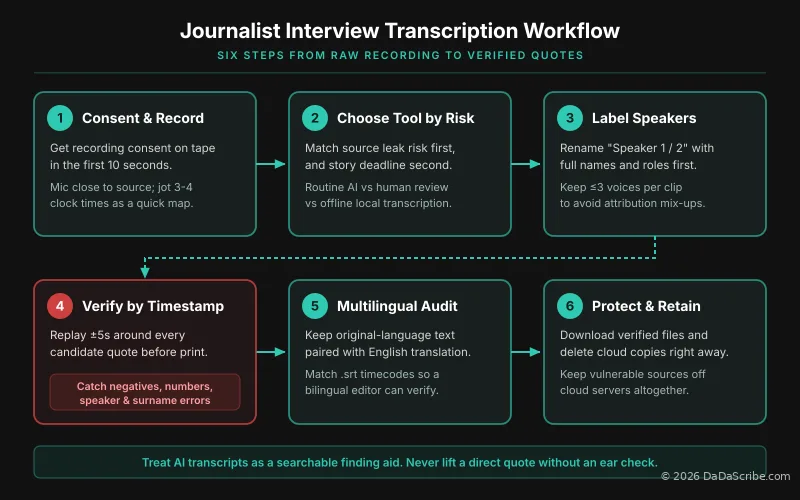
You finish a 45-minute interview at noon, your editor wants copy by three, and you have an audio file sitting on your phone. Here is the short answer to how journalist interview transcription works on a deadline: get recording consent on tape first, pick a tool that fits your source's risk level, rename speaker labels before pulling quotes, check every line you print against its timestamp, keep the original-language text beside any translation, and delete cloud copies once your files are backed up.
That six-step routine is what I walk reporters and student journalists through when they ask how to transcribe an interview without letting speed turn into a correction notice. Follow it in order, and you go from raw phone, Zoom, or field audio to checked quotes in minutes instead of spending your afternoon hitting rewind.
Step 1: Get consent and record clean audio
Good journalism interview transcription is mostly decided before you ask your second question. Recording consent laws depend on where you and your source are sitting: in the United States, federal law and most states require one-party consent, while other states require everyone on the call to agree, and interstate calls carry the stricter rule. Check the Reporters Committee for Freedom of the Press recording guide before you dial. Then get consent on the recording in the first ten seconds by stating the date, your name, your source's name, and that you are recording to quote them accurately. If a source asks to go off the record or onto background midway through, say the exact clock time out loud on tape so nobody misreads those paragraphs a week later.
Once consent is sorted, match your setup to where the interview happens:
In-person interviews
Put your phone or recorder close to the source rather than in the middle of a table. Resist the urge to say "uh-huh" or "right" while they finish a thought; nod instead so your voice does not clip the end of their sentence. Keep a notepad open and jot three or four clock times whenever something sharp lands. Those four numbers give you a map of the interview before the transcript even finishes running.
Phone calls
Avoid speakerphone in a busy room because echo and phone compression smear consonants. Use a headset or direct call recorder where local law allows it, and if the interview cannot be redone, keep a second device recording beside you as insurance against a dropped file.
Zoom and remote interviews
When your call app lets you record locally or save each speaker on a separate track, turn that on instead of capturing compressed audio through laptop speakers. If you do not want to install extra software, DaDaScribe's browser recorder can also capture live audio straight from your computer mic and email the finished transcript when it is done.
Of course, real reporting rarely happens in a quiet office. When traffic, café chatter, or wind ruins a field recording, running audio cleanup before speech recognition starts does far more for accuracy than buying another microphone, which we covered in detail in our guide to fixing noisy interview transcripts.
Step 2: Choose transcription software for journalists by risk and deadline
No single tool fits every assignment, because a routine city-council interview and a confidential source sit under completely different rules. When deciding how to transcribe interviews, ask two things first: who gets hurt if this audio leaks, and when does the story file?
For daily reporting on the record, AI wins on both clock and budget: a 60-minute press conference takes 2 to 3 hours to type by hand and about 2 to 3 minutes with AI, while defamation-heavy investigations or badly garbled audio still merit a human pass. We broke down that exact line in our AI vs human turnaround guide for journalists.
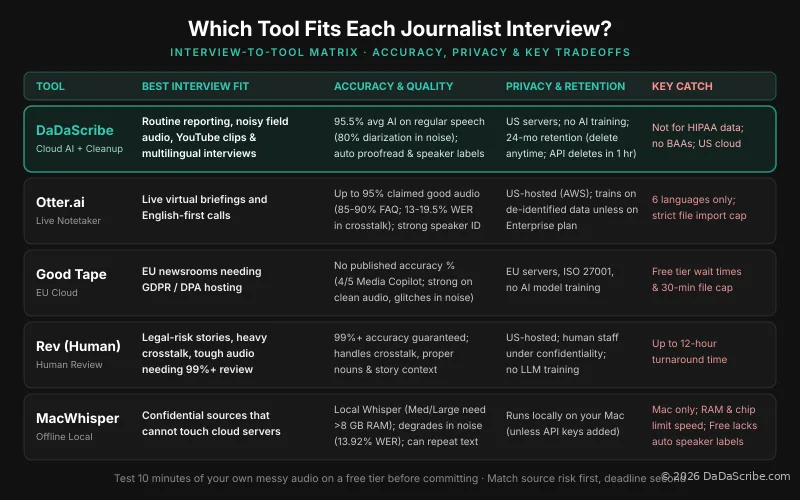
Here is how five tools reporters actually use compare, pulled from each company's published pricing and accuracy pages along with independent 2026 benchmarks.
| Tool | Best for | Published pricing | Accuracy and quality | Privacy and retention | Key catch |
|---|---|---|---|---|---|
| DaDaScribe | Routine reporting, noisy field audio, YouTube clips, multilingual interviews | Free $0 (30 min/mo, no card); Basic $4.99/mo ($39/yr, 3 hrs/mo); Standard $9.99/mo ($79/yr, 8 hrs/mo); Pro $29.99/mo ($239/yr, 30 hrs/mo); Ultra $69.99/mo ($549/yr, $0.007/min, 100 hrs/mo) | 95.5% average AI accuracy on regular speech in our internal production data (80% diarization across noisy or overlapping audio); includes automatic proofreading and speaker labels | US servers; no AI training; 24-mo retention (delete anytime; API deletes in 1 hr) | Not for HIPAA data; no BAAs; US cloud processing |
| Otter.ai | Live virtual briefings and English-first calls | Basic Free (300 min/mo, 30 min/call, 3 lifetime imports); Pro $16.99/mo ($8.33/mo annual, 1,200 min/mo, 10 imports/mo); Business $30/mo ($19.99/mo annual, unlimited live / 6,000 import min/mo); Enterprise custom | Vendor claims up to 95% on good audio (85-90% on its audio-to-text FAQ); Stork's AMI meeting test measured 13.0%-19.5% word error rate with crosstalk; strong speaker ID | US-hosted (AWS); trains models on de-identified data unless Enterprise | 6 languages only; strict file import limit on lower plans |
| Good Tape | EU newsrooms needing GDPR/DPA hosting | Free €0 (3 tapes/mo, 30 min max/file); Pro €20/mo (€192/yr, 20 hrs/mo); Business custom | Publishes no accuracy number (Good Tape notes results vary by audio and language); Media Copilot rated it 4/5, strong on clean audio with occasional glitches in noise | EU servers, ISO 27001, no AI training | Priced in EUR; free tier has wait times and 30-min cap |
| Rev (Human) | Legal-risk stories, heavy crosstalk, tough audio needing 99%+ review | Human $1.99/min (per-minute); AI Essentials $29.99/seat/mo ($25.49 annual, 5,000 min/mo); AI Pro $59.99/seat/mo ($47.99 annual, 10,000 min/mo); AI Unlimited custom | Vendor guarantees 99%+ accuracy with human transcribers; handles heavy crosstalk, proper nouns, and context that trip up AI models | US-hosted; human transcribers under confidentiality; no LLM training | Roughly $60 for a 30-min interview; up to 12-hour turnaround |
| MacWhisper | Confidential sources that cannot touch cloud servers | Free €0 (unlimited local files, no minute cap; some models limited); Pro €64 one-time license (unlimited local files, all models) | Depends on the local model your Mac can run (Tiny through Large v3; Medium/Large need >8 GB RAM): smaller models trade accuracy, Free lacks auto speaker labels, and local Whisper degrades in noise (13.92% WER in Yap's cafe-noise test) and can repeat text | Runs locally on your Mac (unless you add cloud API keys) | Mac only; speed and model choice depend on your Mac's RAM and chip |
Before you commit to any paid plan, I always suggest running ten minutes of your own messy audio through a free tier first so you can judge the transcript quality with your own ears.
Match the tool to the risk of the source first, and the deadline second. Speed is useless if sensitive tape ends up somewhere it shouldn't.
Step 3: Rename speaker labels before you mine quotes
This step applies specifically to multi-speaker recordings: one-on-one interviews, press scrums, and panel discussions. Opening a transcript full of "Speaker 1" and "Speaker 2" and copying quotes right away is how a reporter's question accidentally gets published as the source's answer.
Before you hunt for lines to use, rename every speaker tag with the person's full name and role. In DaDaScribe's guided upload flow, you can enter the speaker order before the job even starts so labels arrive mapped from the beginning. That thirty-second habit prevents mix-ups later when you are skimming fast on deadline.
I also want to be upfront about where multi-speaker diarization breaks down. On two- or three-person interviews where people take turns, automatic speaker separation works reliably: you can see it in our public demo of the two-and-a-half-hour Lex Fridman interview with Greg Lukianoff. Once four or more people talk over each other in a live hearing, speaker tags degrade quickly, which is why DaDaScribe warns against more than three voices talking in the same clip. If you cover panels or roundtables regularly, our speaker diarization guide explains how to keep those tracks clean.
Step 4: Verify every quote against timestamps
An AI transcript is a searchable draft. Treat it as a finding aid, not finished copy. Under the SPJ Code of Ethics, a reporter is responsible for every word published regardless of what software produced the first pass. Newer speech models that automatically strip filler words or smooth out self-corrections create an extra wrinkle I looked at in our Gemini 3.5 Transcribe analysis for journalists: cleaning up phrasing can make a hesitant answer sound ironclad.
You do not need to re-listen to an entire 60-minute tape to be thorough. Scan the transcript, pull the four or five candidate quotes you plan to use, note the timestamp next to each one, and replay the audio from five seconds before the quote to five seconds after it. Those ten extra seconds verify surrounding context and catch three mistakes that fool a fast visual read. The quotes below are made-up examples, but these are the patterns to listen for:
| Failure mode | Raw AI transcript (Before) | Verified against timestamp (After) | Why it matters |
|---|---|---|---|
| Lost negative | "We did renew the inspection contract after the audit." | "We didn't renew the inspection contract after the audit." (14:22) | One clipped contraction flips the story 180 degrees. |
| Swapped number | "The department cut fifty positions in Q3." | "The department cut fifteen positions in Q3." (21:08) | Sound-alike numbers ("15" vs "50", "$1.5M" vs "$15M") always need an ear check. |
| Wrong speaker and surname | "REPORTER: Mayor O'Neill signed the memo." | "COUNCILMEMBER PATEL: Mayor O'Neil signed the memo." (08:41) | Checking multi-speaker labels and spelling prevents a formal correction. |
Never paste a quote straight from AI text into a draft. Listen five seconds before and after the timestamp to verify the speaker, the numbers, and any negatives.
If the interview is already public on YouTube, such as a committee hearing or broadcast appearance, you do not have to download the video or convert file formats at all. Paste the YouTube URL straight into DaDaScribe and you get the transcript and timed .srt files back, as in our BBC News AI law demo and Elon Musk CNBC interview demo.
Step 5: Handle multilingual interviews without losing the source text
Cross-border journalism interview transcription goes sideways when reporters translate straight from audio into English and throw away the original-language transcript. If an English line reads awkwardly, having no source text leaves you guessing whether the interviewee stumbled, the speech model misheard a word, or the translation bent the nuance.
Generate the original-language transcript first, keep it matched to the translation through .srt timestamps, and ask a bilingual editor or native speaker to verify any quote you intend to print. We outlined that same paired workflow in our four-step foreign-language audio review guide: you scan the English translation in minutes to locate the critical moments, then audit those exact timestamps against the original wording.
DaDaScribe transcribes from 98 source languages and translates into up to five of 116 target languages in a single job. You can check the side-by-side output on our BBC Mundo Spanish-to-English demo, where the Spanish transcript and the English translation line up with matching .srt timecodes.
Step 6: Protect sources and manage retention
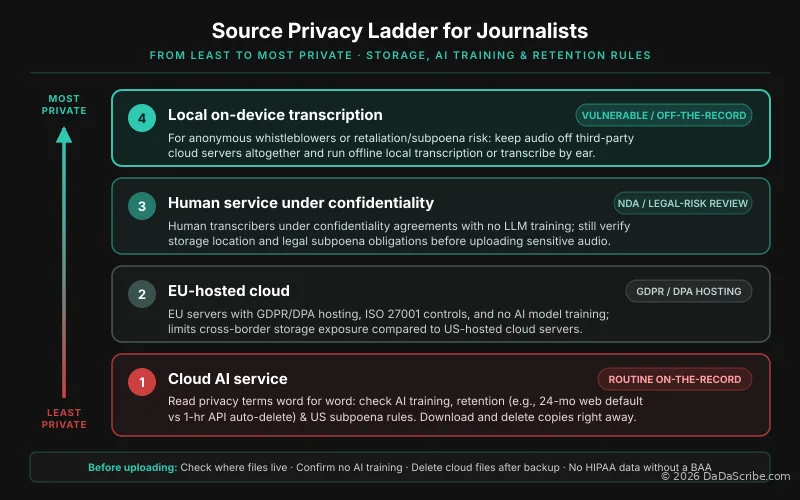
Source protection is where reporters should read privacy pages word for word instead of guessing. Before uploading an interview anywhere, check where files live, whether they train models, and how fast you can wipe them.
Every service handles storage, third-party processors, and deletion differently, so I will use DaDaScribe as one concrete example here; check your own tool's privacy policy for its rules. Under DaDaScribe's Privacy Policy and Terms of Service, InfiniStrategy, LLC runs web servers in the United States and stores uploaded files with cloud storage providers including Amazon Web Services. Automated processing runs through our own software alongside third-party AI providers (currently AssemblyAI for most spoken-word recordings, OpenRouter routing text to Google Gemini for automatic proofreading, and RunPod for audio pre-processing). Human staff do not listen to or read your interviews during normal processing, your uploads and transcripts are never used to train AI models, and our contracts and settings prohibit our providers from training on them either. Our multi-speaker feature separates voices inside one file so you can label them, and never builds voiceprints across separate recordings.
On DaDaScribe, retention works in two ways under our policy. Standard web uploads, browser recordings, and transcripts remain in your account for 24 months unless you delete them sooner, or close your account from the Account Info panel (which deletes your account and files from our servers immediately, while provider copies are removed when jobs finish or promptly, normally within 24 hours). Files submitted through the DaDaScribe API delete automatically 1 hour after the job finishes. We also spell out the limits plainly: sensitive files are uploaded at your own risk, DaDaScribe does not sign Business Associate Agreements (so do not upload HIPAA-protected health data), and like any US company we must respond to valid subpoenas or court orders.
For working journalists, the practical rule is simple. On routine on-the-record interviews, download your verified transcript and audio to your newsroom drive and delete the job from your account right away instead of leaving files sitting on a vendor's server for months or years. For anonymous whistleblowers or sources facing real legal or physical risk, keep the audio off third-party cloud servers altogether and run offline local transcription or transcribe the key passages by ear.
Frequently asked questions
Are AI transcripts accurate enough to quote directly in a story?
Across the real recordings processed on DaDaScribe, average AI accuracy is about 95.5%, which is plenty for searching notes and outlining a piece. Noisy field audio does worse. Either way, never lift a direct quote without replaying the timestamped audio to verify names, numbers, and negatives.
How do I keep source recordings private when using transcription software?
Check two terms before uploading: whether the vendor trains models on customer audio, and how long files stay on its servers. DaDaScribe never trains on your files, lets you delete uploads from your account immediately after downloading, and deletes API jobs 1 hour after completion. If a source faces genuine retaliation or subpoena risk, keep the recording offline on your own machine instead of sending it to any cloud service.
Should I transcribe a foreign-language interview straight into English?
No, if you plan to publish direct quotes. Always keep the original-language transcript paired with the English translation by timestamp so a bilingual editor can check what the speaker actually said against the audio.
How much does journalist interview transcription cost?
On DaDaScribe's plans, you get 30 free minutes every month with no credit card required. Basic is $4.99/month ($39/year) for 3 hours, Standard is $9.99/month ($79/year) for 8 hours, Pro is $29.99/month ($239/year) for 30 hours ($0.016/min monthly), and Ultra is $69.99/month ($549/year) for 100 hours, reaching as low as $0.007/min on Ultra yearly. By comparison, human-verified transcription from a service like Rev costs $1.99/minute.
Try it on your next interview
If you want to see how this workflow feels before your next deadline, look through the real outputs on our demos page or run ten minutes of a tough recording through DaDaScribe's free 30-minute monthly plan. You will know in a few minutes whether the timestamps, speaker labels, and audio cleanup save enough hours to keep in your reporting kit.
Comments & Questions
Please log in or sign up for a free account to leave a comment or question.
No comments yet. Be the first to ask a question!
Display more comments…