
Someone hands you a two-hour recording in Spanish. Or Portuguese, or Arabic. It came in discovery, or a client found it online, and nobody on your team can tell you if there's anything in it worth worrying about.
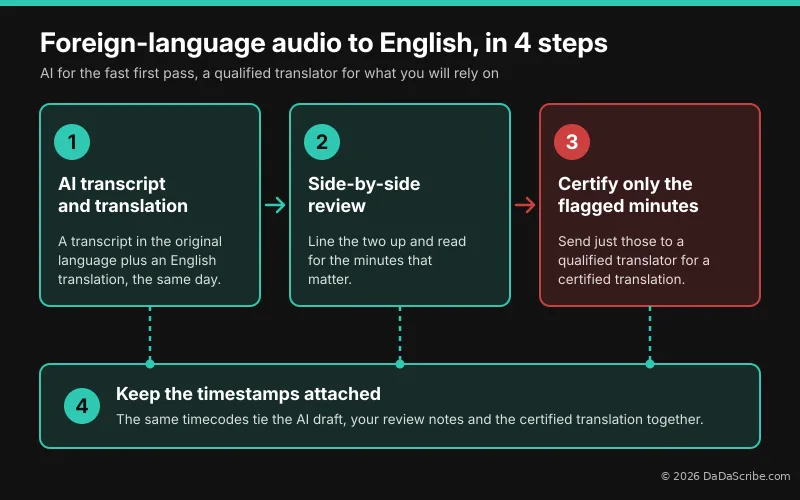
Here's the short answer to how you translate foreign language audio to English for legal review. You do it in four steps:
- Get a transcript in the original language plus an English translation, the same day.
- Line the two up side by side and read for the minutes that matter.
- Send only those minutes to a qualified translator for a certified translation.
- Keep the timestamps attached at every step, because they tie it all together.
That's it. The rest of this article is how I'd do each step if I were in your shoes, and the mistakes I'd avoid.
Why I wouldn't send the whole file to an agency first
I understand the instinct. A certified agency is the safe choice, and for anything you'll put in front of a court, you'll need one anyway. The problem is timing. You end up paying for every minute before you know whether a single one of them matters.
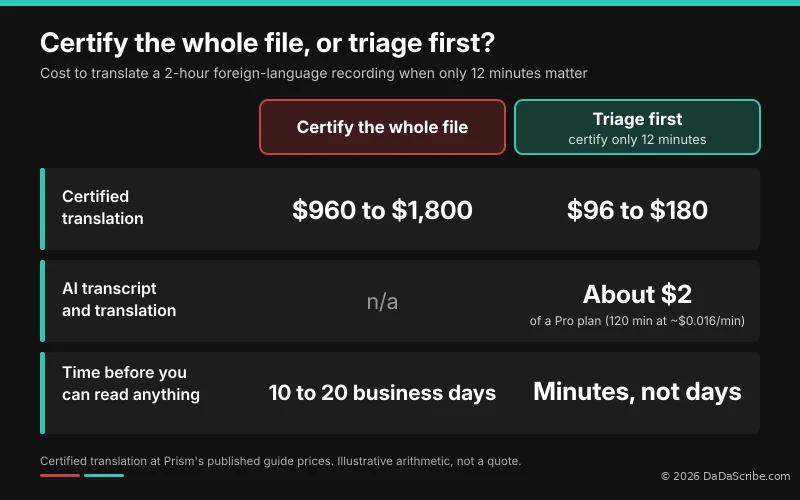
Look at what foreign language audio evidence usually costs. Prism Language Solutions publishes guide prices of about $8 to $15 per audio minute for two-column transcription plus English translation, with a turnaround of 5 to 10 business days per hour of audio. For our two-hour file, that's $960 to $1,800 and two to four weeks of waiting. And poor-quality recordings cost more.
Even the agencies tell you not to do it this way. Access Multilingual says that "identifying the relevant segments by timestamp is the single biggest cost saving available." I couldn't agree more. That one sentence is the whole idea behind this workflow.
What I would never do is skip the original-language transcript and jump straight to English. Prism refuses to do that "for anything evidentiary, because there is then no way to check what the translator heard." The NAJIT position paper on forensic transcription translation lays out the same order: a verbatim source transcript first, then the English. Some AI tools offer a direct-to-English mode. It's fine for getting the gist. For anything you might rely on later, you want the source text on file.
Pay for certified translation on the minutes that matter, not on the two hours that don't.
Step 1: Transcribe the source and translate foreign-language audio to English
This is the step that used to take weeks and now takes minutes. In DaDaScribe you paste a YouTube link or upload the file, enter the speakers, pick the source language, and choose English as a destination. You get back a transcript in the original language, an English translation, and a timecoded .srt subtitle file for each.
I like that the source transcript always comes first. It's the same order the forensic guidelines ask for, so even your rough draft starts from the right foundation.
I put a Spanish demo on our demos page so you can see the output before trying it on anything real: ¿Qué efecto tiene el café en el cuerpo? | BBC Mundo. It's a 6 minute 16 second public health explainer read by one narrator. If you need to transcribe Spanish audio to English text, this is what you get. The English reads like normal prose. The Spanish line "Para adultos sanos, el límite recomendable es de 400 miligramos de cafeína por día, lo que equivale a 4 o 5 tazas de café" comes out as "For healthy adults, the recommended limit is 400 milligrams of caffeine per day, which is equivalent to 4 or 5 cups of coffee." That's the kind of draft you can skim fast. Download the English .txt when you want to translate Spanish audio to an English transcript you can read like a document.
A few things I'd do when you set up the job:
- For multiple speaker recordings, use neutral speaker labels like SPEAKER 1 and SPEAKER 2 unless you know for sure who's talking. Access Multilingual puts it well: a translator who labels columns with the parties' names "is making an identification that is not theirs to make." Keep it to three speakers or fewer when you can. Our upload form warns that more than three "is not recommended," and I'd take that seriously.
- If the video is already public, paste the link instead of downloading and re-uploading it.
- Add a second destination language if a client or co-counsel reads something other than English. Several of the demos on our demos page carry five languages from a single job.
Step 2: Build a side-by-side bilingual transcript
This is my favorite part, and I haven't seen other tools show it.
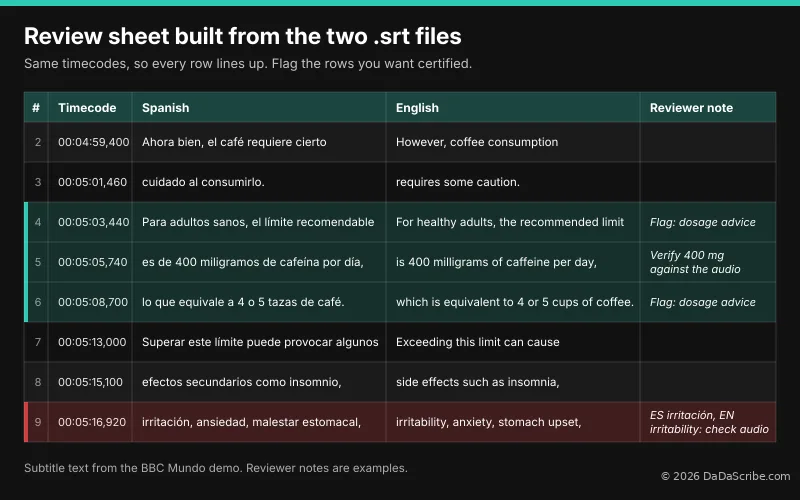
On the BBC Mundo demo, every English subtitle cue starts and ends at exactly the same time as its Spanish cue. All 143 of them. That means you can build a two-column review table in a spreadsheet in about five minutes:
- Open the Spanish .srt and the English .srt.
- Paste each one into its own column.
- The rows line up, because the timecodes match.
- Add a column for speaker and one for your notes.
Here's what three rows look like:
| Timecode | Spanish (source) | English (translation) |
|---|---|---|
| 00:05:03,440 --> 00:05:05,740 | Para adultos sanos, el límite recomendable | For healthy adults, the recommended limit |
| 00:05:05,740 --> 00:05:08,300 | es de 400 miligramos de cafeína por día, | is 400 milligrams of caffeine per day, |
| 00:05:08,700 --> 00:05:11,220 | lo que equivale a 4 o 5 tazas de café. | which is equivalent to 4 or 5 cups of coffee. |
One mistake to avoid: don't judge the translation one row at a time. Subtitle cues split sentences in half, so a single row can look odd on its own. Read across three or four rows, the way the sentence actually runs.
If anyone on your team reads a little of the source language, this table is where they help most. They can check any English line against the original right next to it.
Matching timecodes turn two subtitle files into a bilingual review table. Every row you flag already carries its timestamp.
Step 3: Flag the minutes that matter, and be honest about what AI misses
Now you read. You're not certifying anything yet. You're deciding where to look, and marking every row that touches names, dates, money, admissions, or anything you'd quote in a filing.
We process thousands of transcriptions every month at DaDaScribe, so I'll be straight with you about the draft you're reading. On clean spoken audio, DaDaScribe averages 99.5% accuracy. A phone call, a street recording, or two people talking over each other will score lower. That's true for every tool out there, ours included.
There are three things I'd want any reviewer to know.
First, our automatic proofreading uses an AI language model to correct misspelled words based on context. It does not flag words it couldn't hear. If the audio drops out, your reviewer has to add the [inaudible] marks.
Second, "who said what" is the weakest spot for every AI system. In our AI vs human transcription analysis, speaker separation averages around 90%, and drops to around 80% when voices overlap or sound alike. Double-check attribution on anything you flag if you are dealing with a multi-speaker recording.
Third, noisy audio hurts everything downstream. DaDaScribe cleans background noise before transcribing, and our guide on background noise in interview transcription covers what else you can do with a rough recording.
The AI draft tells you where to look. A qualified human decides what it says.
Step 4: Certify only those minutes
Once you know which timecodes matter, send just those to a qualified transcriber-translator. Here's what I'd put in the brief:
- The exact timecode ranges, straight from your review table.
- A short list of names, places, and case terms you pulled from the AI draft, so they come back spelled consistently.
- The speakers' region or dialect, if you know it.
- How many people are talking.
- A note that the AI draft is context only, not the deliverable.
Access Multilingual asks for exactly this kind of brief: say whether you need the whole recording or identified segments, give timestamps, and provide names and case-specific terms.
Here's how it plays out on our two-hour example, using Prism's published guide prices. Say 12 minutes turn out to matter. This is my own arithmetic, not a quote.
Two honest caveats. Agencies often have minimum charges. U.S. Language Services, for example, lists a $90 project minimum. And our plans are monthly subscriptions, so you pay for the month, not per file.
What you can upload, and what to check first
This part is short, but please don't skip it.
Our Terms of Service allow you to upload sensitive financial, medical, or personal information, at your own risk, and you're responsible for any consents the law requires. If you're a HIPAA covered entity or business associate, you need a signed Business Associate Agreement before you upload any protected health information. Email support@dadascribe.com and we'll get it to you.
Two more things worth knowing. We don't use your uploads or transcripts to train AI models. And we keep files for 24 months, so download what you need.
Before you upload anything, check your firm's or hospital's policy and your client's consent. Rules on foreign-language transcripts also vary by court, so check your local rules before you lean on any of this.
Tip: medical and compliance teams can use the same four steps on non-English patient education videos, earnings calls, or public statements. Same method, smaller bill.
If you want a broader look at which tools fit this kind of work, we compared several of them in our guide to the best transcription tools for legal and medical professionals.
Try it on the demo before your next case
You don't have to take my word for any of this. Open the Spanish to English BBC Mundo demo, download both .srt files, and build the side-by-side table yourself. It takes about five minutes, and you'll know whether this fits how your team works.
Then transcribe and translate audio of your own. DaDaScribe transcribes 99 languages and translates into more than 120. The free plan gives you 10 minutes a month, which is enough to test the hardest stretch of a real recording. Paid plans start at $4.99 a month.
The next time a foreign-language recording lands on your desk, you won't have to wait weeks to find out what's in it. You'll know by the end of the day which minutes are worth paying for.
Comments & Questions
Please log in or sign up for a free account to leave a comment or question.
No comments yet. Be the first to ask a question!
Display more comments…