
Yesterday, August 26 2026, Google dropped Gemini 3.5 Transcribe. Four point zero percent Word Error Rate streaming, 85+ languages, automatic cleanup of filler words and self-corrections. The model already powers Rambler on Gboard for Android and voice dictation in the Gemini macOS app. It is coming to Chrome next. The tech press jumped on the specs. Seventy percent faster than the previous Chirp 3 model. Ninety-six thousand token context window. Emotion detection. Speaker diarization. All of it is real, and all of it is impressive. But nobody answered the question that actually matters to the people who transcribe interviews for a living.
What does Gemini 3.5 Transcribe mean for journalists? The ones recording interviews in noisy cafés, filing on deadline, quoting sources whose words can end up in court.
This article translates the announcement into something you can use. What the specs mean for your workflow. How to access the model today. The ethical questions about AI-cleaned quotes nobody is asking yet. And where a service like DaDaScribe fits now that transcription is becoming as built-in as spellcheck.
Gemini 3.5 Transcribe is a real step forward. But for journalists, the model you use matters less than what happens to your audio before it gets there.
What Gemini 3.5 Transcribe Actually Is
Gemini 3.5 Transcribe is Google's most advanced speech-to-text model. It is not a standalone product. It is a model that powers features across Google's ecosystem and is available to developers via API.
Where it is already live:
- Rambler on Gboard for Android: voice typing with automatic cleanup of filler words and self-corrections
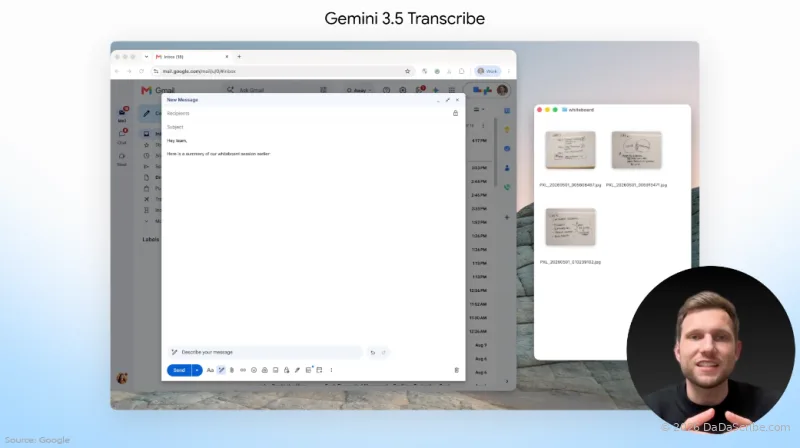
- Gemini macOS app: voice dictation that outputs polished, formatted text
- Google AI Studio: upload audio files for transcription via the Interactions API
- Gemini Live API: real-time streaming transcription with sub-second latency
Coming soon: Chrome integration. Dictation into any text field on the web.
The numbers:
- 4.0% Word Error Rate streaming, 2.6% non-streaming. Measured by Artificial Analysis.
- 5.50% streaming / 5.04% non-streaming on the FLEURS multilingual benchmark across top languages
- 96,000-token context window: roughly 2 hours of audio in a single pass
- 85+ languages with automatic detection and regional accent handling
- 70% latency improvement over Chirp 3, Google's previous transcription model
Features beyond raw transcription:
- Smart transcription: auto-removes filler words ("um," "ah") and resolves self-corrections. You say "let's meet Tuesday, no, Wednesday" and the model outputs "let's meet Wednesday."
- Speaker diarization: labels who said what, with timestamps. Reliable for up to 3 speakers. Support for 4+ is experimental.
- Custom vocabulary: teach the model specialized jargon, proper names, unique spellings
- Emotion detection: identifies emotional tone in speech. Potentially useful for flagging tense moments in interviews.
What This Actually Means for Journalists
The specs are interesting. Specs do not file stories. Here is how each capability translates to your actual work.
4.0% WER: quoting with confidence on deadline
Word Error Rate measures how many words the model gets wrong. At 4.0% WER streaming, Gemini 3.5 Transcribe gets roughly 1 word wrong in every 25. On a 5,000-word interview transcript (a typical long-form piece) that is around 200 errors.
Is that good? Yes, relative to where we were a year ago. For same-day filing: you can pull quotes from the transcript with light proofreading and be reasonably confident. The days of spending more time fixing a bad transcript than just doing it manually are fading.
Is it perfect? No. Two hundred errors across a long interview means you still need to review. For quotes you plan to publish verbatim, especially from public figures, legal contexts, or contentious interviews, always verify against the audio. That last sentence is worth reading twice.
At DaDaScribe, our internal benchmarks show 95.5% average accuracy, up to 99.5% on clean speech. The difference comes from what happens before transcription. More on that in a moment.
The model you choose matters. What happens to your audio before it reaches that model matters more.
96K tokens: no more splitting long interviews
A 96,000-token context window means roughly 2 hours of audio processed in one continuous pass. No chunking. No splitting files at arbitrary boundaries. No missed transitions where one chunk ends and the next begins.
For investigative journalists working with long depositions, multi-hour press conferences, or extended field recordings, this changes how you work. The model keeps context across the entire recording. Speaker identification gets better. Consistency improves. And you stop wasting time stitching chunked transcripts together.
DaDaScribe has handled long-form content from day one. One of our demo pieces is a 2-hour 31-minute Lex Fridman podcast episode processed in 19 minutes with speaker labels, timestamps, and translation into five languages. View the full transcript here.
85+ languages: one pipeline for international desks
Multilingual support is no longer a premium add-on. Gemini 3.5 Transcribe handles 85+ languages with automatic detection and regional accent awareness. For international correspondents and multilingual newsrooms, this means one pipeline instead of language-specific services.
DaDaScribe supports 99 source languages and translates output into 120+ languages. That is the widest language coverage in the transcription market. If you cover stories across borders, you do not need to change tools when you change countries.
How Journalists Can Actually Access This Today
Tech blogs describe APIs. Journalists need to know where to click.
| Access Method | Best For | How to Get It | Limitations |
|---|---|---|---|
| Google AI Studio | Individual journalists testing the model | aistudio.google.com, free tier, upload audio files directly | Requires Google account. Audio processed on Google's cloud. Free tier has usage limits. |
| Gemini API (Interactions endpoint) | Newsrooms building custom pipelines | Pay-per-use via Google Cloud | Needs developer setup. Not plug-and-play. |
| Gemini macOS app | Journalists on Mac who dictate drafts | Download Gemini app: voice dictation with smart formatting | Dictation only. No audio file upload for interview transcription. |
| Chrome (coming soon) | Dictation into any text field | Wait for Chrome update. Timeline not confirmed. | Dictation only. Not for transcribing recorded audio. |
| DaDaScribe | Journalists who need preprocessed, privacy-conscious transcription | dadascribe.com: upload audio/video, preprocessing runs, get clean transcript | Built for recorded audio, not live dictation. |
The Smart Transcription Dilemma: Should AI Clean Up Your Quotes?
Nobody is asking this yet. It might be the most important question in this article.
Gemini 3.5 Transcribe automatically removes filler words and resolves self-corrections. "Let's meet Tuesday, no, Wednesday" becomes "let's meet Wednesday." Useful for meeting notes, internal summaries, research. It saves time and the output is cleaner.
For journalism? It is not that simple.
A source says: "I ... I think maybe that's, um, that's not entirely accurate." Gemini 3.5 Transcribe's smart formatting outputs: "I think that's not entirely accurate."
The first version sounds hesitant, uncertain, human. The second sounds confident and declarative. A journalist quoting the cleaned version is presenting a different person than the one who spoke. The meaning shifts. Not dramatically in one example. But cumulatively, across a long interview, the effect is real.
The AP Stylebook and major newsroom ethics guides do not address AI-cleaned transcripts. Nobody does. This arrived yesterday.
Our take at DaDaScribe: the preprocessing pipeline should clean audio, not words. We handle noise reduction, level normalization, and voice isolation before spoken words reach the transcription engine. We clean the signal, not the speech. What the source said is what you get. For journalists who need to trust that their transcript is verbatim, this distinction is everything.
Practical recommendations:
- Use smart transcription for research, note-taking, internal summaries. It saves real time.
- For direct quotes in published articles: verify against raw audio or a verbatim transcript. Every time.
- When in doubt, quote what the person actually said. Filler words and hesitations included, if those details convey meaning.
- Add a line to your workflow: "Quotes verified against raw audio." Five seconds. Protects you.
Smart transcription cleans up text. That is great for meeting notes and terrible for journalism. Do not let AI decide how your source sounds.
Source Protection: What Cloud Transcription Means for Confidentiality
Gemini 3.5 Transcribe runs on Google's cloud infrastructure. Your audio leaves your device, travels to a server, gets processed, a transcript comes back. For most interviews this is fine.
For journalists handling sensitive sources, whistleblowers, confidential informants, sources in repressive environments, it deserves a hard look.
Here is what matters:
- Data retention. How long does the provider keep your audio? Is it used for model training? Google's enterprise API terms generally prohibit training on customer data. Free-tier terms may differ. Check.
- Encryption. Audio is encrypted in transit (TLS) and at rest. It is decrypted during processing. That is how transcription works.
- Jurisdiction. Data on US-based servers is subject to US law. Subpoenas, national security letters. If your story involves parties with legal exposure, this matters.
- No standard. There is no industry-wide retention standard for AI transcription. Every provider sets its own policy. Read it.
Practical guidance:
- Public interviews, press conferences, non-sensitive recordings: cloud transcription is perfectly fine. Use whatever gives the best accuracy.
- Confidential sources, sensitive investigations, stories with legal exposure: consider on-device alternatives (local Whisper models) or services with explicit no-retention policies.
DaDaScribe's platform offers you different privacy options. If you use DaDaScribe's website, you can do whatever you want with your transcriptions. Keep them inside your account as long as two years, or delete them whenever you like. DaDaScribe's API, instead, uses time-limited output URLs for third-party implementations. Max 1-hour retention. Your transcript stays up long enough to download it, then it is gone. We designed this for journalist workflows specifically. You cannot leak a transcript that no longer exists.
For a public press conference, cloud transcription works. For a whistleblower interview, the retention policy matters as much as the accuracy number.
Comparison: Transcription Options for Journalists in 2026
No single tool fits every assignment. Here is how the options stack up:
| Feature | Gemini 3.5 Transcribe (API) | DaDaScribe | Otter.ai | Local Whisper |
|---|---|---|---|---|
| Accuracy (clean audio) | 96-97.4% (Artiificial Analysis) | 99.5% (clean speech) | ~93-95% (varies by audio) | 90-95% (varies by model size) |
| Handles noisy field audio | Handles some background noise | Full preprocessing: noise reduction, normalization, voice isolation | Moderate | No preprocessing |
| Speaker diarization | Up to 3 speakers (4+ experimental) | Robust multi-speaker | Yes | Via separate model (diarize) |
| Languages | 85+ source | 99 source, 120 translation | English-focused | 99 (large-v3 model) |
| Source protection | Google cloud: check retention terms | 1-hour output retention | Cloud-based, standard terms | Fully local: best privacy |
| Pricing | Pay-per-use API | Free demo, then $4.99-29.99/mo | Free tier, then $16.99/mo | Free (requires hardware/GPU) |
| Best for | Fast API transcription at scale | Preprocessed, privacy-conscious, multi-language | Real-time meeting notes | Maximum confidentiality |
FAQ
Is Gemini 3.5 Transcribe free for journalists?
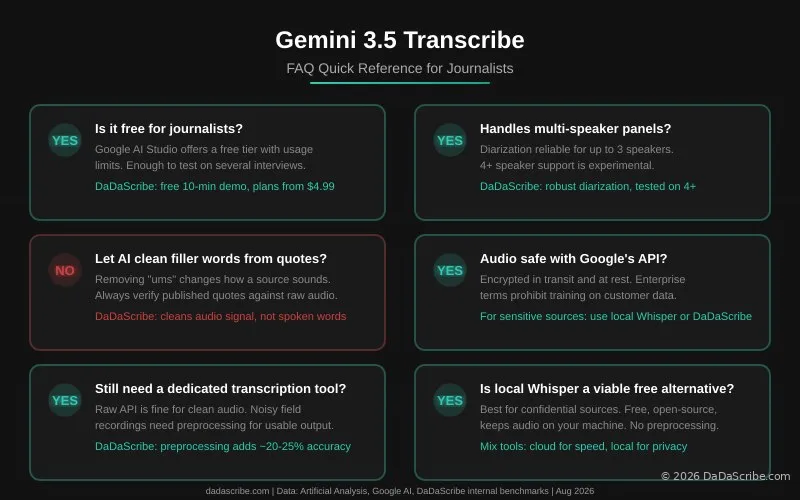
Google AI Studio offers a free tier with usage limits. Enough to transcribe a few interviews and test the model. For regular use, the Gemini API is pay-per-use. DaDaScribe's plans start at $4.99 per month for 3 hours of transcription, with a free 10-minute demo that requires no signup.
Can it handle multi-speaker interviews like press panels?
Yes, with caveats. Speaker diarization is reliable for up to 3 speakers. Google notes that 4+ speaker support is "experimental." For roundtables, press panels, or anything with multiple active voices, expect imperfect labeling. DaDaScribe's diarization is tested on real multi-speaker content. Long-form podcasts, panel interviews with four-plus participants, the kind of audio where speaker labeling actually matters.
Should I let AI remove filler words from quotes I plan to publish?
No. Not without verifying against the raw audio. Removing "ums" changes how a person sounds, and that alters meaning. Use smart transcription for notes and research. For published quotes, verify against a verbatim transcript. Your reputation depends on getting the words right.
Is my audio safe with Google's transcription API?
Google encrypts audio in transit and at rest. Enterprise terms generally prohibit training on customer data. But audio is processed on Google's infrastructure, subject to US law. For non-sensitive work this is fine. For confidential sources, consider tools with explicit no-retention policies or local processing.
Do I still need a dedicated transcription tool if Google's model is this good?
Depends on your audio. For clean, non-sensitive recordings, the Gemini API alone may suffice. For noisy field recordings, preprocessing is the difference between a transcript you can quote from and one you have to fix. DaDaScribe's pipeline adds roughly 20 to 25 percent to transcription accuracy by cleaning audio before it reaches the engine. That improvement applies regardless of which model runs downstream.
What is the best setup for a freelance journalist on a budget?
Start with Google AI Studio's free tier for non-sensitive work. For sensitive material, run Whisper locally. It is free, open-source, and keeps audio on your machine. For noisy recordings where audio quality is the bottleneck, try DaDaScribe's free 10-minute demo to see the preprocessing difference. Mix tools based on the assignment.
The Bigger Picture
Gemini 3.5 Transcribe arriving in Chrome, Gboard, and the macOS app tells you where transcription is headed. It is becoming infrastructure. Something that just works everywhere, like spellcheck. That is useful for everyone who converts speech to text, and especially useful for journalists.
But infrastructure is only as good as what flows through it.
A transcription engine processes the audio it receives. Gemini 3.5, Whisper, whatever model drops six months from now, the rule is the same. Feed it a noisy café recording with street noise bleeding in, you get a noisy transcript. Feed it audio that has been through a preprocessing pipeline (noise reduced, levels normalized, voice isolated) and the same engine produces a cleaner result.
That is where DaDaScribe fits. Not as a replacement for foundation models, but as the layer that makes any model perform better. Our preprocessing pipeline cleans your audio before transcription. Our privacy-first design gives you control over what happens to your recordings after the transcript is delivered.
See it yourself. Upload your own recording to DaDaScribe. Compare the output to whatever tool you use now. Or browse our demos page to see real-world results. That 2.5-hour Lex Fridman episode processed in 19 minutes with speaker diarization and translation into five languages is a good place to start.
For more on audio quality: How to Fix Noisy Interview Transcripts (Without Buying Better Equipment). For the deadline angle: When AI Transcription Beats Human Turnaround for Journalists.
Transcription is getting better fast. The models are improving. The right approach is not to pick one tool and commit. It is to understand what is available and match the tool to the assignment. Gemini 3.5 Transcribe raised the floor. Preprocessing, privacy, and workflow features raise the ceiling.
Comments & Questions
Please log in or sign up for a free account to leave a comment or question.
No comments yet. Be the first to ask a question!
Display more comments…