
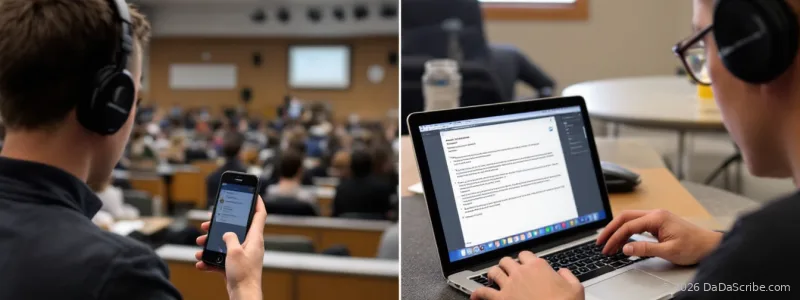
You just sat through a 90-minute lecture on organic chemistry. You recorded the whole thing on your phone. You upload it to your transcription tool, wait a few minutes, and open the result.
Half of it reads like a foreign language. "Alkene" became "Al Keen." "Nucleophilic substitution" turned into "nucleo filic substitution." Three entire sentences merged into one unbroken paragraph with no punctuation.
You blame the transcription tool. But the problem started earlier. With the app you used to record.
A Ditto Transcripts study found that AI transcription platforms average just 61.92% accuracy on real-world audio with background noise, multiple speakers, and varied accents. But at the same time our own recent study on AI vs Human Transcription, unraveled an astonishing 95.5% average level of accuracy on our DaDaScribe platform. Why is that? Well, Some of that is on the transcription engine. A lot of it is on the recording. The difference between the best and worst recording app can swing your final transcript accuracy by 30 percentage points.
Here is a breakdown of four popular voice recorder apps built purely for recording audio, what makes each one tick for lecture capture, and how your choice of recording app feeds into transcription results.
What Matters for Transcription: Format, Noise Handling, and Workflow
Before comparing individual apps, it helps to understand what makes a recording transcription-friendly.
Audio format is the biggest lever. Uncompressed formats like WAV preserve the full frequency range that speech recognition models depend on. Compressed formats like AAC strip high-frequency detail. The difference between "alkene" and "Al Keen" is a fraction of a second of audio data. Compress it away and the engine guesses.
Noise reduction during capture matters as much as during transcription. An app that cleans background hum, chair squeaks, and room echo before the file ever hits a transcription engine gives that engine a pre-cleaned signal. The engine does not have to separate speech from noise because the work is already done.
Workflow matters too. How easily can you get the audio file out of the app and into your transcription tool? Some apps export clean WAV files with one tap. Others lock you into compressed formats with no way out.
With these three factors in mind, here is how four popular recording apps stack up.
App-by-App Breakdown
1. Dolby On
Dolby On was built for musicians. It applies noise reduction and EQ during recording. Features designed for capturing acoustic guitar in a bedroom studio. They turn out to be remarkably effective for capturing a professor in a lecture hall.
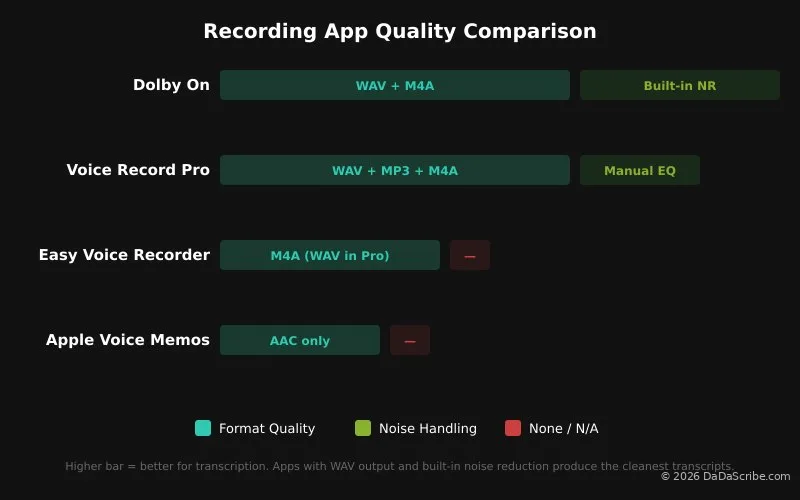
The built-in noise reduction cleans up background chatter, chair squeaks, and HVAC hum before the file ever reaches a transcription engine. This is the only app in the list that pre-processes audio during capture rather than leaving all cleanup to the transcription tool.
Format: WAV and M4A options.
Noise handling: Yes. Built-in noise reduction and EQ applied during recording. The strongest noise handling of any app we looked at.
Workflow: Requires a free account. Export is straightforward once set up. The music-focused interface feels slightly misaligned for lecture recording, but the results speak for themselves.
Best for: Large lecture halls, noisy environments, outdoor classes. Any situation where background noise is your primary enemy.
Weakness: Requires sign-up. Interface is music-oriented rather than lecture-oriented. Some features behind account wall.
2. Voice Record Pro
Voice Record Pro is the power user's choice. It offers granular control over format (WAV, MP3, M4A), bitrate, and sample rate. Built-in tools let you trim, normalize, and convert recordings without leaving the app.
The catch is the default settings. Out of the box, Voice Record Pro records in compressed MP3. With configuration (WAV format, 44.1kHz sample rate, 16-bit depth) it produces excellent results. Without tweaking, it performs only slightly better than Voice Memos.
Format: Configurable. WAV, MP3, M4A available. Defaults to MP3.
Noise handling: None built in, but manual EQ controls available.
Workflow: Powerful but complex. Spend five minutes configuring it once and the rest of the semester is smooth. Skip configuration and you are recording MP3.
Best for: Students who do not mind spending five minutes configuring settings before the semester starts.
Weakness: Overwhelming interface. Too many options for someone who just wants to hit record and go.
3. Easy Voice Recorder
Easy Voice Recorder delivers on its name. It is clean, simple, and available on both iOS and Android with a home screen widget. The free version records in M4A. The Pro version ($4 one-time) unlocks WAV and cloud uploads.
It does not have Dolby On's noise reduction, but it also does not have Voice Record Pro's learning curve. It is the reliable, boring option. And sometimes that is exactly what you want.
Format: M4A (free), WAV (Pro, $4).
Noise handling: None.
Workflow: Simple export, home screen widget for quick access. Pro version needed for WAV.
Best for: Android users, students who want simplicity with slightly more control than Apple Voice Memos.
Weakness: Pro version needed for WAV format. Without it, format quality is closer to the built-in app tier.
4. Apple Voice Memos
Voice Memos is the default recording app on iOS. It lives on every iPhone home screen, it opens in one tap, and it does not ask questions. That is its strength and its weakness.
The app records in compressed AAC format. In a quiet room with a speaker three feet away, it performs fine. In a lecture hall with reverb and 200 students shuffling papers, the compression strips the frequencies that speech recognition models depend on.
Format: Compressed AAC. No WAV option.
Noise handling: None. What the mic picks up is what you get.
Workflow: Easy export via AirDrop, Messages, or Files. But the compressed format means the transcription engine starts with less signal.
Best for: Quick captures when you forgot to set up anything else. One-off recordings where perfect accuracy is not critical.
Weakness: No gain control, no format options, compresses audio aggressively. You get what you get.
An app that records uncompressed WAV and applies noise reduction during capture gives your transcription engine a head start. An app that records compressed AAC and sends the engine raw audio with all the background noise makes it work twice as hard.
Why Your Recording App Affects Transcription Accuracy
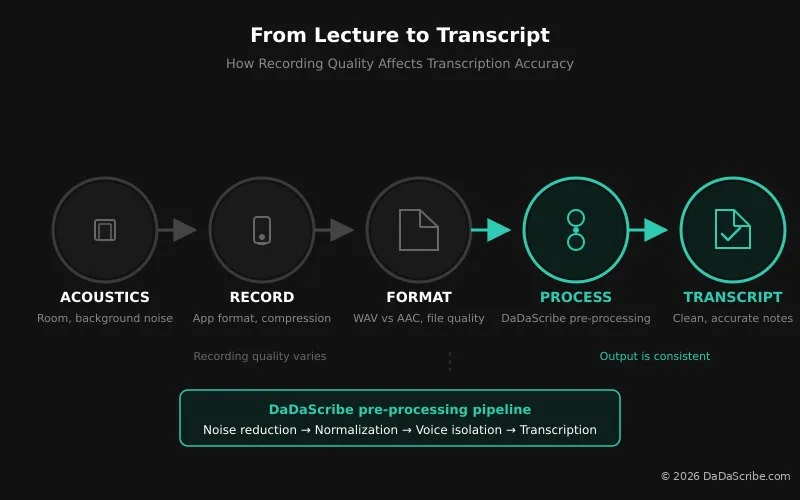
Every recording moves through the same pipeline: room acoustics → microphone pickup → app processing and compression → audio file → transcription engine → text output. Each stage either preserves or loses information.
Compression costs accuracy. When Voice Memos compresses your lecture into AAC at a low bitrate, it discards audio data that speech recognition models use to distinguish similar sounds. WAV preserves everything.
Noise masks speech. A recording app with built-in noise reduction (Dolby On) gives the transcription engine a pre-cleaned file. The engine does not have to separate speech from background chatter because that work is already done. Apps without noise reduction pass the problem downstream.
The transcription engine matters too. Even the best recording app cannot fix a transcription engine that runs raw audio through a speech model with no pre-processing. This is where your choice of transcription tool becomes the equalizer.
DaDaScribe runs a four-stage pre-processing pipeline before the audio ever reaches the speech recognition model: noise reduction cleans up background hum, level normalization evens out volume spikes, voice isolation pulls the speaker forward, and a proprietary processing pass optimizes the signal for Whisper transcription. We covered the full pipeline in our guide to fixing noisy interview transcripts.
What this means: a compressed AAC recording from Voice Memos gets a second chance. The pre-processing pipeline compensates for the recording app's weaknesses. And if you are recording directly in a browser, DaDaScribe includes a built-in live recording feature that captures audio straight from your microphone and processes it through the same pipeline. No intermediary recording app needed.
The takeaway is simple. A good recording app makes the transcription engine's job easier. A transcription engine with strong pre-processing makes a mediocre recording app's job less damaging. Pair both and your lecture notes come out clean.
Best Combos for Different Student Scenarios
The best recording app depends on where you are sitting. Here is what we recommend for common student situations:
| Scenario | Best Recording App | Why |
|---|---|---|
| Large lecture hall (in-person) | Dolby On | Built-in noise reduction handles echo and chatter |
| Small seminar / study group | Voice Record Pro (WAV mode) | Uncompressed WAV captures multiple voices clearly |
| Online class (Zoom, Teams, Meet) | DaDaScribe live recording | Record directly in the browser, no third-party app needed |
| One-on-one research interview | Voice Record Pro (WAV, high bitrate) | Maximum control for critical recordings |
| Quick capture / unprepared | Apple Voice Memos | Always available, good enough in a pinch |
| Thesis or dissertation interview | Voice Record Pro (WAV, high bitrate) | Highest fidelity, configurable format |
Recording Apps at a Glance
| App | Format | Noise Reduction | Price | Best For |
|---|---|---|---|---|
| Dolby On | WAV, M4A | Yes (built-in) | Free | Noisy lecture halls |
| Voice Record Pro | WAV, MP3, M4A (configurable) | No (manual EQ) | Free / $7 Pro | Power users |
| Easy Voice Recorder | M4A (WAV Pro) | No | Free / $4 Pro | Android, simplicity |
| Apple Voice Memos | AAC | No | Free (built-in) | No-fuss quick capture |
Dolby On is free, it works on iOS and Android, and it was designed for musicians. Which means it handles bad room acoustics better than anything built for speech.
Frequently Asked Questions
Do any of these voice recorder apps transcribe directly?
Only DaDaScribe's built-in recorder can do that. All other apps are just recorders: they capture and export audio, and that is all. None of them turns a lecture into a transcript. Transcription happens in the engine you pair the recording with, which is why the app choice is about capturing clean audio, not about accuracy. Pick a recorder that exports WAV, then let a dedicated transcription tool do the words. Or use DaDaScribe's built-in recorder features that you can use with any browser (including your phone's).
Does a more expensive recording app always mean better transcription?
No. The highest-quality output in our analysis came from Dolby On, which is free. What matters is not the price tag but three things: uncompressed output format, noise handling capability, and the transcription engine you pair it with.
Should I buy an external microphone instead?
An external microphone helps, but the recording app matters more for most students. A $20 lav mic plugged into your phone recording through Voice Memos still produces compressed AAC. Start by switching to an app that records in WAV and applies noise reduction. Add a microphone later if you need it.
Here is why lecture recordings transcribe badly, and what fixes them.
Do these apps work on Android?
All four apps have Android versions. Easy Voice Recorder is particularly well-regarded on Android with its home screen widget. Dolby On and Voice Record Pro are available on both platforms and perform identically. Only Apple Voice Memos is iOS-exclusive.
What is the best audio format for transcription? MP3 or WAV?
WAV. It is uncompressed and preserves the full frequency range that speech recognition models use. If file size is a concern (for example, recording three lectures a day) MP3 at 320kbps is an acceptable compromise. Avoid low-bitrate AAC at all costs.
How does DaDaScribe handle recordings from these apps?
DaDaScribe runs every audio file through a four-stage pre-processing pipeline: noise reduction, level normalization, voice isolation, and a proprietary optimization pass. This all happens before transcription begins. The result is that recordings from lower-quality apps like Voice Memos get a second chance. The pipeline does not make a bad recording perfect, but it closes most of the gap. DaDaScribe also offers a live recording feature directly in the browser. Visit dadascribe.com, click record, and the audio is captured and processed through the same pipeline without any third-party recording app at all.
Do I need different recording apps for different classes?
Yes. A large lecture hall benefits from noise reduction (Dolby On). A small seminar with multiple speakers benefits from uncompressed capture (Voice Record Pro in WAV mode). An online class where the audio is already clean can skip the recording app entirely and use DaDaScribe's browser-based live recording to capture audio directly.
Is it worth paying for a recording app as a student?
The free versions of Dolby On and Voice Memos cover the vast majority of student needs. Pay for Voice Record Pro ($7 one-time) or Easy Voice Recorder Pro ($4 one-time) to have WAV export for max accuracy. Of course, a one-time fee of $4-$7 is completely affordable for most students, but always put your money toward a good transcription tool first. That is where the real accuracy gains live.
Put your money toward a good transcription tool. A free recording app paired with a transcription engine that pre-processes audio will outperform a paid app paired with a raw engine every time.
Pick Your App, Then Pick Your Engine
Recording quality is not about expensive gear. It is about picking the right app for the room you are sitting in and understanding what your transcription engine can handle.
For most students, the workflow is simple. Use Dolby On for large lecture halls. Use Voice Record Pro for critical recordings where format control matters. Use Apple Voice Memos when you forget everything else and just need to hit record. For online classes, skip the recording app entirely and use DaDaScribe's browser-based live recording. Pair any of these with a transcription tool that pre-processes audio and your lecture notes will be accurate from the first row to the last.
Comparing transcription tools too? See is Otter.ai good for lectures? compared with DaDaScribe.
Try DaDaScribe free for 10 minutes. Record your next lecture with any of these apps, upload the file, and see what the pre-processing pipeline does with it. Or record directly in your browser using DaDaScribe's live recording feature and skip the third-party app altogether. The same pipeline processes both. Visit dadascribe.com to start, or check out our demos page to see real examples of how different recording qualities affect transcription output. If you are dealing with especially noisy recordings, our guide to fixing noisy interview transcripts walks through the pipeline in more detail. For a deeper look at how transcription accuracy compares across tools, see our AI vs human transcription comparison.
Comments & Questions
Please log in or sign up for a free account to leave a comment or question.
No comments yet. Be the first to ask a question!
Display more comments…