
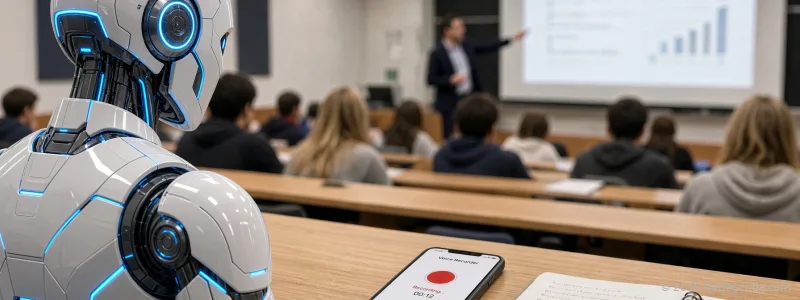
You sit three rows back in a lecture hall built for two hundred. The professor is a distant figure with a soft voice and no microphone. You press record on your phone, pocket it, and trust the machine. Two hours later you open the transcript and the first ten minutes read fine. The last forty read like a word salad written by someone who was also not paying attention. You search "why is my lecture transcript wrong" and every result tells you to buy a microphone.
I think that advice is wrong for most students, wrong twice actually. A good microphone costs $80 or more and does nothing for the recording you already made. And the cleanup-app workflow assumes you have time, patience, and an interest in audio engineering, which you chose a degree instead of learning. Here is the part those guides miss: the problem is not your transcription tool. It is what the tool receives. Fix what the engine hears and the transcript cleans up, no hardware required.
Why your lecture recording fails as transcription input
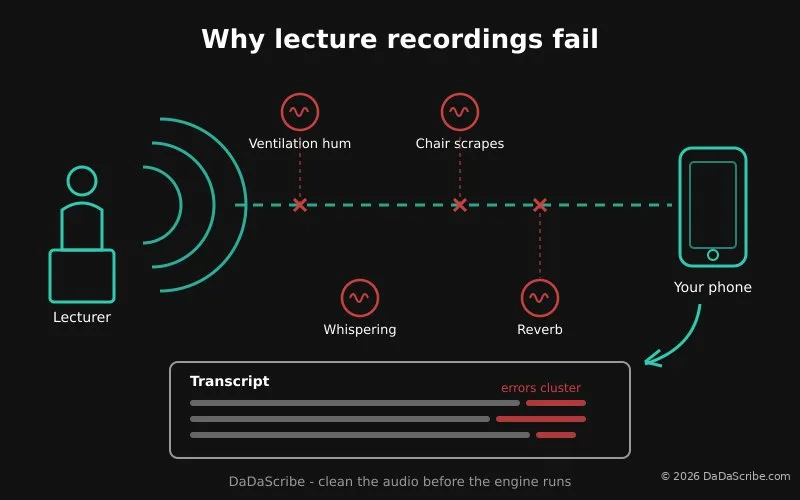
Four things go wrong in a lecture hall, and each one damages the transcript in a specific way.
- Distance. Every meter between the speaker's mouth and your phone's microphone drops the voice level, but the room noise stays exactly the same. Ten rows back, the ventilation hum and the shuffling feet are as loud as the professor. Speech-to-text engines work off the ratio of speech to everything else. At the back of a hall, that ratio is poor.
- Reverberation. Hard walls and high ceilings send sound bouncing. Your phone hears each word twice: once directly, once reflected a fraction of a second later. To a transcription engine, a smeared word looks like a longer, stranger word, and it guesses wrong. Long lecture halls with masonry walls are the worst offenders.
- Overlapping noise. A chair scrapes. Someone coughs. Two students whisper about Friday. The door opens. Each of these lands on top of the professor's words, and it is never random when it happens. It is usually exactly when the engine was least confident, so a small noise pushes an uncertain guess into a certain error.
- Phone mic compression. Your phone's microphone was tuned for voice calls held a hand's width from the face. It compresses loud sounds and boosts quiet ones automatically. That works for a phone call. On a distant lecturer it flattens the differences that a transcription engine uses to tell speech apart from room tone.
One more thing worth knowing: the errors cluster. Noise is not spread evenly through a lecture, so accuracy is not either. The opening minutes, when the room is settled and the professor is introducing the topic, transcribe well. The middle, when the projector fan kicks in and someone's laptop starts a video, collapses. This is why spot-checking the first three minutes of a transcript tells you nothing about the rest of it.
The fix: clean the audio before the engine runs
The missing step in almost every student guide is audio pre-processing. That term means automated cleanup of a recording before transcription runs. It is not the same as transcription itself, and the distinction matters because a speech-to-text engine can only interpret what it is given. Give it a cleaned signal and it has far fewer guesses to make.
Pre-processing covers three jobs:
- Noise reduction removes the steady sounds: ventilation hum, projector fans, electrical hiss. These sit in the background of every lecture recording and bury the quieter parts of speech.
- Level normalization pulls the quiet, distant speech up to a consistent volume. This is the one that matters most for back-of-the-room recordings, because distance quietly deflates the voice while the noise floor stays put.
- Voice isolation separates the lecturer's voice from the leftover room noise, so the engine receives a clear vocal signal instead of a mix.
DaDaScribe runs all three on every upload before its speech engine starts. You do not select filters or learn a timeline editor. You upload the file, the pipeline cleans it, and the transcript comes back from a signal that no longer resembles the raw recording.
The do-it-yourself route exists and I want to be fair to it. Free tools like browser-based audio enhancers and desktop editors can genuinely improve a recording. The cost is not money, it is friction. You export from your recorder, clean in one tool, convert the file, clean again in another, then finally upload for transcription. That is three apps and a workflow to relearn, per lecture, and the results depend on how much audio skill you develop. Some students will enjoy that. Most will do it once and then stop cleaning their recordings at all, which is worse than never starting.
The buying-gear route has the same hole. A directional microphone helps the next lecture and does nothing for last week's, and for many classes you cannot get closer to the lectern anyway. Fixed lecture halls, big courses, assigned seating: the distance is not a choice you made. The recorder manufacturers know this, which is why the advice usually comes from companies selling recorders.
Which brings the decision down to dollars. A free 10-minute demo or a $4.99 per month Basic plan, which covers 3 hours of transcription, fixes the recordings you already have. An $80 microphone fixes the ones you have not made yet.
The problem is not your transcription tool. It is what the tool receives. Clean the input and the transcript follows.
What a fixed lecture transcript looks like in practice
The workflow takes a few minutes of your attention, most of it waiting.
You upload the recording from your phone or paste a link, or record directly in the browser. A guided workflow asks for the source details: the language the lecture was given in, and anything else it needs. Processing runs. The transcript and, if you want it, an SRT subtitle file arrive by email when it finishes.
If you want to see the effect before trusting it with your own coursework, the demos page shows real processed examples, including recordings that arrived noisy, with the processing time and output shown on the page. That is the honest way to evaluate any transcription claim: listen to the source, read the output, judge the gap yourself.
One point students often miss: a lecture in another language is the same problem with the same fix. DaDaScribe transcribes from 99 source languages, and the output can be translated into more than 120. If you are studying in your second language, or you are on exchange, this changes the workflow from "re-listen eight times" to "read it in the language you think in."
Three ways to fix a bad lecture recording
| Approach | Cost | Works on existing recordings | Time per lecture | Skill needed |
|---|---|---|---|---|
| Do nothing, re-listen | Free, but costs hours | Yes | 2-3x lecture length | None |
| Buy a better microphone | $80+ | No, future recordings only | Minimal | None |
| DIY cleanup chain, 2-3 free tools | Free | Yes | 20-40 minutes manual | Moderate audio skill |
| Automated pre-processing and transcription | Free 10-minute demo; Basic $4.99/mo for 3 hrs | Yes | Minutes, hands-off | None |
The first row is the one nobody prices honestly. Re-listening to a 60-minute lecture at half speed, pausing to write, is a 2-3 hour job. Do that across five courses and you have spent more time than a semester of paid transcription costs.
Re-listening to a 60-minute lecture at half speed takes about three hours. Nobody counts that, because it hides in the week instead of on a receipt.
Pro tips for better lecture transcripts
These compound with the automated cleanup. None of them replace it.
- Move the phone, do not buy anything. A phone one or two meters from the speaker beats the back of the hall by a wide margin. If you can walk up before class and put your phone on the lectern or the front desk, do it. Keep it upright, not pocketed, and on airplane mode so an incoming call does not end the recording mid-sentence. The app matters too: see the best voice recorder apps for students.
- Record in mono at the highest quality your phone allows. Mono keeps the lecturer's voice on one clean channel, which is easier to isolate than a stereo mix of a room.
- Run the worst lecture first. Dig up the recording you gave up on. Upload the noisiest ten minutes to the free plan and read the output. Ten minutes of testing on your own material tells you more than ten articles, including this one.
- Use the transcript as actual study material. A clean transcript is searchable. Timestamps let you jump back to the exact moment the professor said "this will be on the exam" in as many words. Highlight in the text instead of scrubbing audio.
- International students: translate the output, then study. Transcribe the lecture in the language it was given, translate the result into your strongest language, and study from that. Reading dense material in your second language is slow; reading it in your first is not, and the content is identical.
- Educators: this is how weekly accessibility transcripts become realistic. Batch processing, which just means uploading several lecture recordings at once, lets a small department produce clean transcripts for every class without adding staff hours. Students who missed the session get the same clean text as the ones who attended, and the SRT subtitle files drop straight onto recorded seminars and departmental videos.
For the deeper mechanics of how cleanup affects accuracy, our guide on fixing noisy interview transcripts covers the same problem from a journalist's angle. And for where AI accuracy actually stands, our AI vs human transcription comparison has the numbers: DaDaScribe's published average is 95.5%, against a 61.92% industry AI average cited by Ditto Transcripts. Take that second figure with some skepticism, since it comes from a human transcription service that benefits from AI looking bad. On clean vocals and clear speech, expect 90% as the floor and 95% as the average.
The best recording setup is the one you already own, positioned closer to the speaker and cleaned before transcription.
Try it before you buy anything
Here is the challenge, and it costs nothing: find the worst lecture recording on your phone. The one you deleted in spirit but not in fact. Upload it and read what comes back.
The free plan covers 10 minutes, which is enough for the noisiest section of any lecture. DaDaScribe adds automatic proofreading and SRT subtitles to every job. Record directly in your browser at dadascribe.com, upload a file, or paste a link, and results arrive by email.
If you want to see what the pipeline does with hard audio first, browse the real examples on the demos page. When you are ready for a full semester, plans start at $4.99 per month for 3 hours, with extra time available anytime and subscriptions canceling whenever you want.
The fix for last week's recording already exists. It costs nothing to find out whether it works on yours.
Comments & Questions
Please log in or sign up for a free account to leave a comment or question.
No comments yet. Be the first to ask a question!
Display more comments…