
Most transcription tool comparisons get student needs completely wrong.
They obsess over real-time meeting transcription, Zoom integrations, and sales call analytics. They rank tools based on how well they auto-join a Google Meet and generate action items for project managers.
Here's the thing: students don't live in Zoom meetings all day.
Students watch recorded lectures on YouTube. They record in-person classes, sometimes on their phones and sometimes directly through their browser. They conduct research interviews in multiple languages. They do all of this on a budget that makes most SaaS pricing laughable.
Otter.ai is a fantastic meeting transcription tool. For students? The workflow, the language limitations, and the pricing don't match how students actually study. DaDaScribe takes a different approach, one built around browser-based recording, YouTube URLs, uploaded files, 99 input languages, and over 120 output languages. All starting at $4.99 a month. Here's why that matters.
The YouTube URL Problem No One Talks About
If you're a student in 2026, the majority of your lecture content probably lives on YouTube. Professors post recorded lectures. Tutorial channels cover your exact coursework. Academic conferences publish full keynote talks. MIT, Stanford, and hundreds of universities host entire course libraries there.
Yet somehow, most transcription tools treat YouTube as an afterthought.
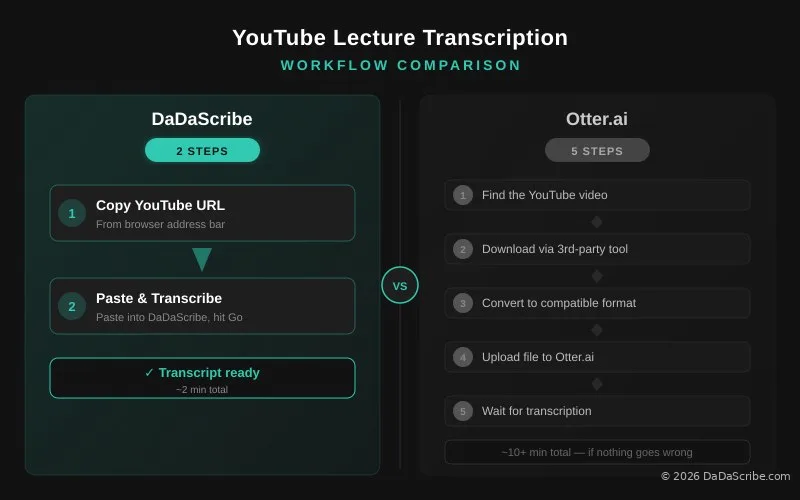
Here's the Otter.ai workflow for transcribing a YouTube lecture: find the video, download it using a third-party tool (Otter doesn't support direct YouTube downloads), convert the file to a compatible format, upload it to Otter, and wait. That's five steps, every single time, and at least ten minutes of friction before you get a single word transcribed.
DaDaScribe does it in two: copy the YouTube URL, paste it into DaDaScribe, done.
Take the Lex Fridman Podcast episode with Greg Lukianoff, a 2 hour 32 minute academic discussion on free speech, deplatforming, and censorship. DaDaScribe processed the full episode in 19 minutes and 39 seconds, delivering a timestamped transcript with speaker labels in English plus translations to French, Italian, Portuguese, and Spanish. You can see the full output on our demos page.
That's the difference between a tool designed for meeting-heavy professionals and one designed for people who learn from content.
Record Lectures Directly, No App Required
Otter.ai records lectures too, and it does something DaDaScribe doesn't: live transcription. Words appear on your screen in real time as the professor speaks. It's a genuinely useful feature for following along during class.
But there's a catch that matters a lot to students: Otter's recording requires installing their app. You need either the iOS or Android app to record, and live transcription only works through the app, not the browser.
Here's why that's a problem on a real campus. University computer lab machines are locked down, no app installs allowed. Your phone storage is full. You forgot to update the app and now it won't open. You borrowed a friend's laptop for a study session. In every one of those scenarios, Otter's recording is unavailable to you.
DaDaScribe's recorder works anywhere with a browser. Open dadascribe.com, hit the Record button, and start capturing the lecture. No app needed. No install. No permissions to configure. It runs on any laptop, tablet, or phone with a modern browser.
When the lecture ends, hit stop. Your recording is already on DaDaScribe's servers, no upload step, no waiting over campus Wi-Fi. Processing starts immediately, and your transcript (with speaker labels, SRT subtitles, and optional translations) is ready in minutes.
Here's how they compare side by side:
| DaDaScribe | Otter.ai | |
|---|---|---|
| Recording | Browser-based, any device | App-based (iOS/Android) |
| Live transcription | After recording | Real-time during recording |
| Upload step | None (already on server) | None (app processes locally) |
| Translations from recording | 120+ languages | Not available |
| Works on university computers | Yes (browser) | No (requires app install) |
Otter's live transcription is the better option if you want to follow along word-by-word during a lecture and you always have your phone handy. DaDaScribe's browser recording is the better option if you want the transcript translated into your native language afterwards, or if you're on a device where installing apps isn't practical.
For most students, the tradeoff comes down to this: do you want real-time text you can read during class (go with Otter), or do you want a translated transcript you can study from after class (go with DaDaScribe)?
They aren't mutually exclusive. Record in Otter for the live transcription during class, then upload that audio to DaDaScribe afterwards for translation and SRT export. Best of both worlds.
99 input languages & 120+ output languages vs just 5: International Students Deserve Better
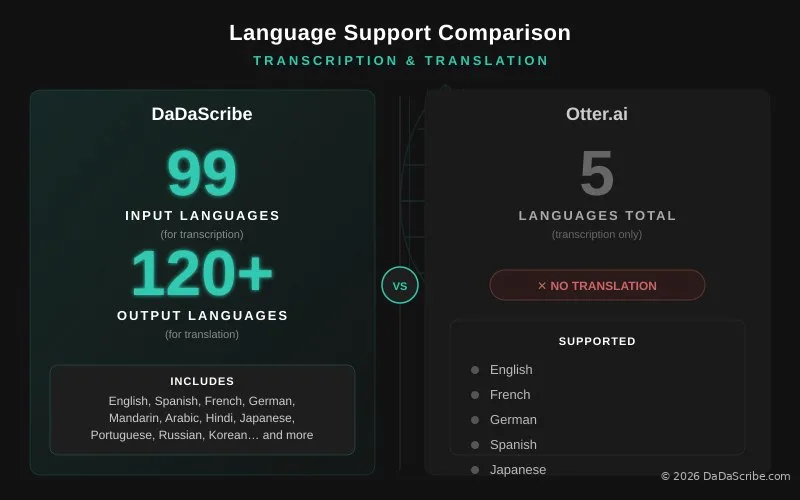
Otter.ai supports five languages: English, French, German, Spanish, and one additional. If your coursework involves lectures in Mandarin, Arabic, Japanese, Hindi, Portuguese, Russian, or any of the other 90+ languages students around the world actually use, you are out of luck.
DaDaScribe transcribes 99 input languages and translates output into 120+ languages. The difference is not academic. It changes how international students interact with course material.
Here's a real scenario millions of international students face every semester: you're studying at an English-language university but English is not your first language. Your professor posts a dense lecture on YouTube. You understand most of it, but the technical terminology and rapid pacing mean you miss critical details.
With Otter.ai, you get an English transcript. That's it. You cannot translate it into your native language for study review. You cannot generate side-by-side bilingual notes. You get text in one of five languages, and you hope that's enough.
With DaDaScribe, you paste the YouTube URL, select your native language as the translation target, and get a full transcript in English plus a translated version in the language you think in. You also get SRT subtitle files in both languages, useful for re-watching the lecture with captions in your preferred language.
Our demo of Elon Musk on CNBC shows this in practice: a five-minute English interview transcribed and translated simultaneously into Chinese, French, Portuguese, and Spanish. One upload. Five languages. Five minutes of processing.
If English isn't your first language, run every lecture transcript through DaDaScribe's translation to create bilingual study notes. Reading complex concepts in your native language alongside the original English improves comprehension and retention.
The Real Math: $4.99 vs $16.99
Let's talk pricing, because this is where most student-focused comparisons fall apart.
Otter.ai Pro costs $16.99 per month and gives you 1,200 minutes (20 hours) of transcription. On paper, that's $0.85 per hour. A solid rate if you're transcribing a dozen meetings a week.
DaDaScribe Basic costs $4.99 per month and gives you three hours of transcription. The per-hour rate is $1.66, which looks worse at a glance.
But here's what the per-hour comparison misses: most students aren't transcribing 20 hours of content per month. The average student transcribes one to three lectures, somewhere between two and five hours total. At that volume, DaDaScribe Basic is the perfect fit, and Otter.ai's "better rate" becomes irrelevant because you're paying for capacity you'll never use.
The annual numbers make this stark:
| Monthly Price | Monthly Hours | Best For | |
|---|---|---|---|
| DaDaScribe Basic | $4.99 | 3 | 1–3 lectures/month |
| DaDaScribe Standard | $9.99 | 8 | Weekly lecture + research |
| DaDaScribe Pro | $29.99 | 30 | Research teams, thesis work |
| Otter.ai Pro | $16.99 | 20 | Live meeting-heavy users |
A student who transcribes three lectures a month saves $12 a month (or $144 per year) choosing DaDaScribe Basic over Otter.ai Pro. That's a textbook. Or two months of groceries. Or the difference between having a transcription tool and going without.
And when your needs grow (say you're a graduate student conducting interview-based research), DaDaScribe Standard ($9.99 for 8 hours) and Pro ($29.99 for 30 hours) scale with you without the enterprise price tag. See all DaDaScribe plans and pricing for the full breakdown.
Otter.ai's lower per-hour rate only wins at volumes most students never reach. At real student usage levels, DaDaScribe saves you $12 a month.
Auto SRT and Proofreading: The Features That Come Standard
Most transcription tools output plain text and call it done. DaDaScribe includes two additional features on every plan, including the $4.99 Basic tier, that change how students use transcripts.
Auto SRT Subtitles
Every DaDaScribe transcription comes with timestamped SRT subtitle files. This means you can overlay captions on lecture videos, share timestamped transcripts with study groups, or import them into video players for accessible review. Otter.ai gates SRT export behind its $16.99 Pro plan.
Built-in Proofreading
DaDaScribe runs every transcript through a proofreading engine that catches errors other tools leave behind. We benchmark at a 95% average accuracy, with a 99.5% accuracy under ideal conditions. Otter.ai's real-world classroom accuracy sits around 82–85% according to independent testing published by VoiceMemos in 2026.
For a student reviewing a biochemistry lecture, the difference between 85% and 95% accuracy is the difference between "mitosis" and "my toast is" in your study notes.
Real Demo: Transcribing an Academic-Style Discussion
Let's walk through a real example relevant to students and researchers.
The Greg Lukianoff episode of the Lex Fridman Podcast is essentially a long-form academic interview, 2 hours and 32 minutes of dense discussion on constitutional law, free speech philosophy, and the history of deplatforming. The kind of content a political science or law student might reference in a paper.
Here's what DaDaScribe delivered:
- Processing time: 19 minutes and 39 seconds
- Output: Full English transcript with speaker-labeled paragraphs
- Translations: French, Italian, Portuguese, and Spanish, all generated in the same processing window
- Formats: Raw text, SRT subtitles in all five languages, downloadable exports
No competitor at this price point delivers five language outputs from a single upload. Otter.ai can't translate at all. Fireflies.ai and Notta offer translation on paid plans only, and neither matches DaDaScribe's language breadth.
You can explore the full output yourself on the DaDaScribe demos page.
When Otter.ai Wins (Honest Comparison)
This article would be incomplete without acknowledging where Otter.ai genuinely excels.
If your academic workflow revolves around live Zoom or Google Meet calls (virtual office hours, online study groups, collaborative research meetings), Otter.ai's OtterPilot feature is impressive. It auto-joins scheduled calls, transcribes in real time, and post-meeting AI summaries show up in your inbox. For that specific use case, Otter.ai is the better tool.
But here's the reality check for students: how much of your learning actually happens in live Zoom calls? For most students, the answer is "once a week, maybe." The rest: in-person lectures (recorded directly in your browser), YouTube lectures, recorded classes, interview recordings, podcast episodes assigned as coursework. All asynchronous content.
Simple decision rule: If 80% or more of your transcription needs are live video calls, go with Otter.ai. If 80% or more of your content is pre-recorded (YouTube, uploaded files, voice memos), DaDaScribe gives you more languages, more formats, and lower monthly costs.
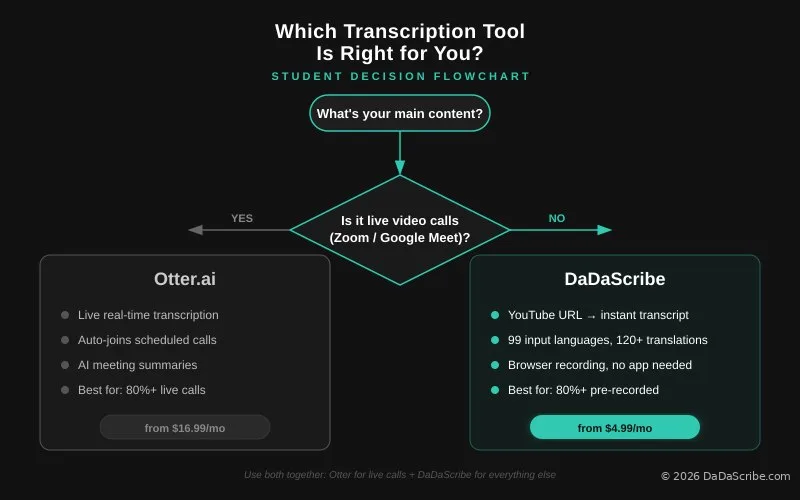
You don't have to choose one tool permanently. Many students use Otter.ai's free tier for the occasional live Zoom lecture and DaDaScribe Basic for their regular YouTube and uploaded content. Combined monthly cost: $4.99.
Pro Tips for Students and Academic Teams
Record Direct in Your Browser
For in-person lectures, skip the app entirely. Open dadascribe.com on your laptop, hit Record, and close the lid halfway so it keeps running. No install needed, and the recording is ready for transcription the moment you stop. If you want live transcription during class, record in Otter and upload the file to DaDaScribe afterwards for translation and SRT export.
Create Bilingual Study Notes
If you're an international student or studying a foreign language, run every transcript through DaDaScribe's translation engine. Reading material in both your native language and the lecture language improves comprehension of complex concepts.
Research Teams, Skip Rev
If your thesis or lab is conducting interview-based research, DaDaScribe Pro at $29.99 for 30 hours crushes Rev's AI pricing ($0.25/minute = $450 for 30 hours). That's a $420 saving per 30-hour research batch. Even Rev's human transcription at $1.50/minute runs $2,700 for the same volume, nearly 90x more expensive. And accuracy is not much different. I personally used to use Rev's human transcription service, and they failed consistently on specific technical terms!
Use SRT Files for Accessibility
Export SRT subtitles from every lecture transcript and overlay them on your video files. This creates accessible study materials for students with hearing impairments and makes content searchable by timestamp.
Integrate With Your Note-Taking Stack
Paste DaDaScribe transcripts directly into Notion, Obsidian, Roam Research, or any markdown-based note app. A semester's worth of searchable, cross-referenced lecture notes becomes a personal knowledge base.
Browse our demos or read more guides for tips on getting the most from your transcripts. Also check out our breakdown of AI vs human transcription in 2026 for a deeper look at transcription accuracy.
Comments & Questions
Please log in or sign up for a free account to leave a comment or question.
No comments yet. Be the first to ask a question!
Display more comments…