

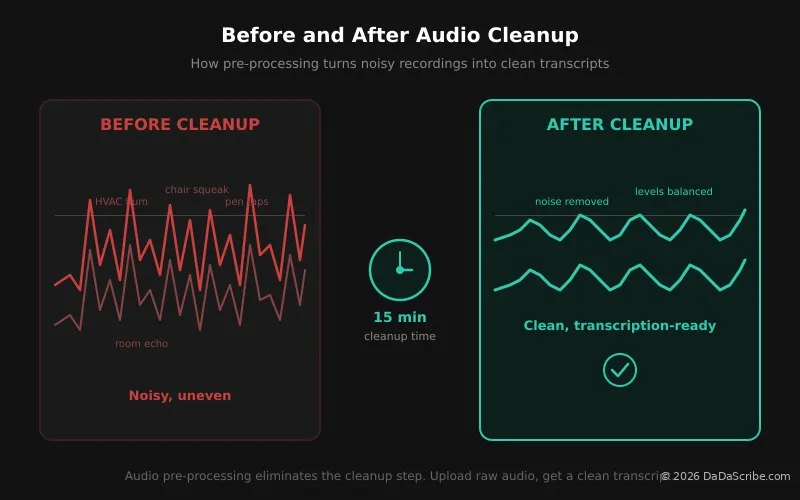
You receive a 45-minute interview file from a client. Two speakers. One is close to the mic, the other sounds like they are in a different room. The HVAC hum is constant. Someone keeps tapping their pen on the table.
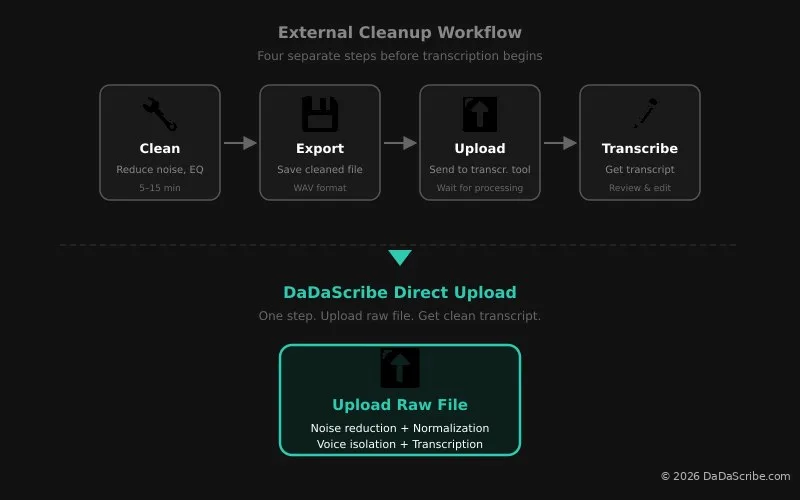
Before you type a single word, you open Audacity. You select a noise profile. You apply noise reduction. You normalize the levels. You export a cleaned WAV. You upload it to your transcription tool.
Fifteen minutes have passed. You have transcribed nothing.
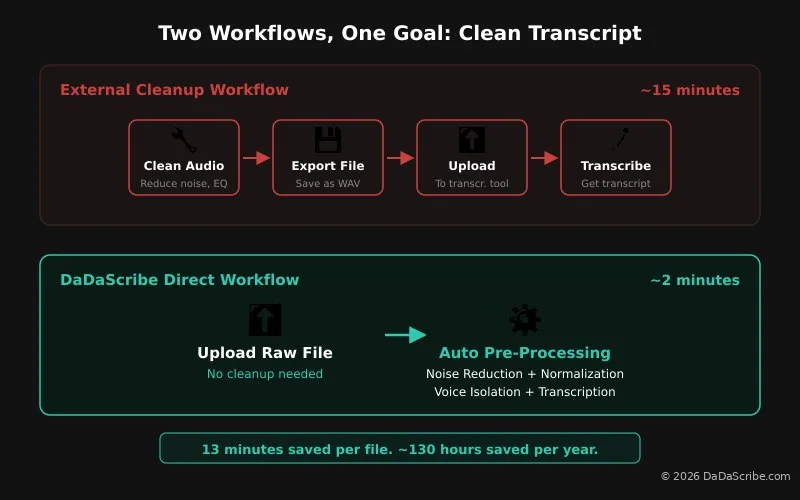
Freelance transcribers report spending 20 to 30 percent of their working time on audio pre-processing. That is time spent cleaning files, not earning money. At a standard freelance rate, 15 minutes of cleanup per file across 10 files per week adds up to 2.5 hours of unpaid work every week. Over a year, that is 130 hours you could have spent transcribing, not cleaning.
The instinct to clean audio before transcribing is correct. Bad audio means bad transcription. The assumption that you need a separate tool for it is outdated.
We compared five popular audio cleanup tools that freelance transcribers actually use, plus what happens when you skip cleanup entirely and use a transcription engine with built-in pre-processing.
The Transcriber's Pre-Processing Habit
The standard workflow for a transcriber dealing with less-than-perfect audio looks like this: receive the file, check the quality, and if it is noisy, open a cleanup tool. Apply noise reduction. Normalize levels. Maybe run an EQ pass. Export a cleaned file. Then, finally, upload it to your transcription tool and start the actual work.
Transcribers do this because they have learned the hard way that transcription engines are unforgiving. A recording with background hum, uneven speaker volumes, or room echo produces a transcript full of errors. Garbage in, garbage out.
But here is the thing. Every minute spent on cleanup is a minute you are not getting paid for. And most transcribers are using transcription tools that simply never built audio pre-processing into their pipeline. The cleanup step exists because the tools require it to exist, not because the audio demands it.
This article does not argue against audio cleanup. It argues against doing it yourself.
Tool-by-Tool Breakdown
1. Audacity
Audacity is the free, open-source audio editor that almost every transcriber has installed at some point. It is the Swiss Army knife of audio work. It does not specialize in any one thing, but it does a lot of things well enough.
For transcription prep, Audacity's noise reduction effect is the go-to. You select a section of the recording that contains only noise (a pause between sentences, a moment of silence), capture the noise profile, then apply noise reduction to the entire file. It works well for steady background hum like HVAC systems or computer fans. It struggles with intermittent noise like chair squeaks or pen taps.
The learning curve is moderate. Basic cleanup takes about five minutes to learn but requires the same manual steps every time. There is no batch processing in the standard workflow. Every file gets the same treatment, one at a time.
Format exports: WAV, MP3, OGG, FLAC, and more.
Price: Free.
Best for: Transcribers on a zero budget who handle a few files per week and do not mind the manual steps. Good for occasional use. Frustrating at scale.
2. Adobe Podcast
Adobe Podcast was built for podcasters. Its headline feature is "Enhance Speech," a one-click processing button that removes background noise, normalizes levels, and reduces reverb. Podcasters loved it. Transcribers noticed.
The workflow is dead simple. Upload a file. Click Enhance Speech. Wait about 30 seconds. Download the cleaned file. That is the whole thing. No noise profiles to capture. No sliders to adjust. No export settings to configure.
The output is polished. Voices come forward. Background hum disappears. It is not surgical (it cannot remove a specific sound while leaving everything else intact) but for speech cleanup, surgical is usually overkill.
Format exports: WAV or MP3.
Price: Free. Requires a free Adobe account. No paid tier, no usage limits.
Best for: Transcribers who want polished audio fast without learning a DAW. The best free option for pure speech cleanup. If your files need a quick pass before transcription, this is the tool to beat.
3. iZotope RX
iZotope RX is the industry standard for audio restoration. Film studios use it. Forensic audio analysts use it. Podcast producers use it. It is the tool you reach for when the audio is so bad that nothing else works.
RX has separate modules for every type of audio problem: spectral de-noise for background hum, de-reverb for room echo, de-click for mouth noise, de-clip for distorted recordings, voice de-noise for broadband noise. Each module has granular controls. You can remove a single chair squeak from a recording without affecting the speech around it.
The learning curve is real. RX is professional-grade software with a professional-grade interface. Most freelance transcribers will use maybe five percent of its capabilities. The spectral display alone takes time to read fluently.
And then there is the price. RX Standard costs $399 per year. RX Advanced costs $1,199 per year. For a transcriber who charges per audio minute, that is a significant overhead before the first file is processed.
Format exports: WAV, MP3, and every professional format.
Price: $399/year (Standard), $1,199/year (Advanced).
Best for: Transcribers handling forensic or legal audio where every syllable matters and the audio is genuinely difficult. For everyone else, it is like using a scalpel to open an envelope.
4. Auphonic
Auphonic is automated audio post-production designed for podcasters and broadcasters. It applies loudness normalization, noise reduction, and leveling in one pass. The difference between Auphonic and the other tools on this list is batch processing: feed it multiple files and walk away.
The noise reduction is good, not great. It handles steady hum well. It is less aggressive than Adobe Podcast, which means less risk of artifacts but also less dramatic cleanup. The real strength is consistency. Every file comes out at the same loudness level with the same noise floor.
For transcribers handling batch work from the same client (multiple interviews from the same conference, multiple episodes of the same podcast), Auphonic's set-and-forget approach saves time at scale.
Format exports: WAV, MP3, FLAC, AAC, OGG.
Price: Free for 2 hours of processed audio per month. Paid plans from $12/month for 9 hours. $24/month for 20 hours.
Best for: Transcribers handling batch work where consistency across files matters as much as per-file quality. The free tier covers light use.
5. Krisp
Krisp is different from everything else on this list. It is not a post-processing tool. It is a real-time noise cancellation filter. Designed originally for call centers and remote meetings, Krisp removes background noise during live audio capture.
How it works: Krisp sits between your microphone and your recording app. It processes the audio in real time, removing background voices, traffic noise, keyboard clicks, and room echo before the sound ever hits the recording. The recording itself is clean from the start.
Prevention beats cleanup: see condenser vs dynamic microphones for transcription.
For transcribers who record live interviews or meetings, this changes the workflow entirely. Instead of recording noisy audio and cleaning it later, you record clean audio from the start. No post-processing. No separate cleanup step. Just a clean file ready for transcription.
Krisp does not work on pre-recorded files, however. It is capture-time only. If a client sends you a noisy recording, Krisp cannot help.
Format exports: N/A. Krisp processes audio in real time. It does not export files.
Price: Free for 60 minutes per day. Pro at $8/month for unlimited.
Best for: Transcribers who record live sessions. Krisp cleans the audio during capture. Pair it with a transcription tool that also pre-processes and you get two layers of cleanup.
Every minute you spend cleaning audio is a minute you are not getting paid for. The right transcription tool does the cleanup for you.
The Built-In Alternative: DaDaScribe's Pre-Processing Pipeline
Every tool above requires the same multi-step workflow: open the cleanup tool, process the audio, export a cleaned file, upload it to your transcription tool, wait for the transcript. That is four steps before a single word of transcription happens.
DaDaScribe takes a different approach. Instead of asking you to clean the audio first, it cleans the audio automatically as part of transcription. You upload the raw file. DaDaScribe does the rest.
Here is what happens inside the pipeline:
1. Noise reduction. Removes background hum, room tone, and steady-state noise. The HVAC disappears. The computer fan goes silent.
2. Level normalization. Evens out volume differences between speakers. The person close to the mic and the person across the room come out at the same level.
3. Voice isolation. Pulls the speaker forward in the mix. Background chatter and room reverb are pushed back.
4. Proprietary processing. Optimizes the signal specifically for Whisper transcription. This is the stage that makes the difference between a transcript with errors and one that reads like the speaker was in a studio.
All four stages run automatically before transcription begins. You do not configure them. You do not adjust sliders. You do not export and re-upload. You upload the raw file and get back a clean transcript. Our demos page has real examples of noisy recordings processed through the pipeline. Interviews with construction noise in the background, conference calls with cross-talk, lecture recordings from the back of a lecture hall.
The time math is simple. A 30-minute file takes about two minutes to process through DaDaScribe. You spend zero minutes on cleanup.
Feature Comparison at a Glance
| Tool | Noise Reduction | Learning Curve | Batch Processing | Price |
|---|---|---|---|---|
| Audacity | Good (manual) | Moderate | No | Free |
| Adobe Podcast | Excellent (1-click) | Minimal | No | Free |
| iZotope RX | Unmatched (surgical) | Steep | Yes | $399/year |
| Auphonic | Good (automatic) | Low | Yes | Free (2h/mo) |
| Krisp | Excellent (real-time) | Minimal | N/A | Free (60min/day) |
| DaDaScribe | Built-in (automatic) | None | Yes | Free 10min/mo or $0.96/hr |
What Cleanup Actually Costs Per Year
Let us put real numbers on this. A freelance transcriber handling 20 hours of audio per month, with half of those files needing cleanup before transcription:
| Tool | Annual Cost | Notes |
|---|---|---|
| Audacity + transcription tool | $0 + transcription costs | Free, but manual cleanup eats 1+ hour/week |
| Adobe Podcast + transcription tool | $0 + transcription costs | Free, fast, but still a separate step |
| iZotope RX Standard | $399 | Pro-grade, but most transcribers use a fraction of it |
| Auphonic (paid) | $144 | Batch processing for consistent work |
| Krisp Pro | $96 | Real-time only, no post-processing |
| DaDaScribe (20 hrs/mo) | ~$230 | No cleanup step. Upload and transcribe in one pass |
The difference between iZotope RX at $399 and DaDaScribe at $230 is not just $169 saved. It is the 65 hours per year of cleanup time you get back. At a freelance rate of $30 per audio hour, those 65 hours are worth about $1,950 in billable work you could have done instead.
Frequently Asked Questions
Do I really need audio cleanup if most of my source files are clean?
If your clients consistently deliver clean audio, you do not need a cleanup tool at all. Upload directly to a transcription engine. But most freelance transcribers work with whatever the client sends. Zoom recordings, conference room audio, phone interviews. Those files always need help. The question is whether you do the cleanup or let your transcription tool do it.
Can Audacity really compete with paid tools?
For basic noise reduction, yes. Audacity's noise reduction effect, applied correctly, produces results comparable to entry-level paid tools. The tradeoff is time and repetition. Audacity requires the same manual steps for every file, which adds up across a week of work. It also cannot match the one-click convenience of Adobe Podcast or the surgical precision of iZotope RX. Our free Whisper preprocessing pipeline walks through the exact Audacity and FFmpeg steps.
What is the actual learning curve for iZotope RX?
Steep enough that most transcribers will not use it to its potential. RX is built for audio engineers who read spectrograms fluently. If you already work with spectral editing, it is the best tool on the market. If you want cleaner audio fast, Adobe Podcast or Auphonic are better fits for a fraction of the effort.
How does DaDaScribe compare to using a separate cleanup tool?
DaDaScribe eliminates the cleanup step. You upload the raw file and the pre-processing pipeline handles noise reduction, normalization, and voice isolation automatically before transcription. The output is a clean transcript without you ever opening a separate audio editor. Our demos page shows real examples of noisy recordings processed through the pipeline. For a deeper look at how pre-processing affects accuracy, see our guide to fixing noisy interview transcripts.
What about Krisp for live transcription work?
Krisp is excellent for transcribers who record live sessions. It cleans the audio in real time during capture. Pair Krisp with a transcription tool that also pre-processes audio and you get two layers of cleanup. Krisp handles the live noise. DaDaScribe handles the rest. It is the best of both worlds.
Do clients expect transcribers to use professional cleanup tools?
Most clients do not care what tools you use. They care about the accuracy of the final transcript. If you deliver a clean, accurate transcript from a raw upload, that is what matters. Only forensic or legal transcription clients may require documented tooling or chain-of-custody processing.
Is iZotope RX worth it for a freelance transcriber?
Not for most. RX costs $399 per year and is built for audio restoration professionals, not transcribers. The only scenario where it makes sense is if you specialize in forensic or legal transcription where audio quality is extremely poor and accuracy requirements exceed 99 percent. For the other 95 percent of transcription work, DaDaScribe's built-in pipeline or a free tool like Adobe Podcast produces results that meet or exceed client expectations. For a broader look at transcription accuracy benchmarks, see our AI vs human transcription comparison.
The best audio cleanup tool in 2026 is the one you do not have to open.
Stop Cleaning. Start Transcribing.
Audio cleanup is a real part of the transcriber's workflow. But it should not be your job. The best cleanup tool is not the one with the most modules or the lowest price. It is the one built into your transcription engine so you never have to think about it.
For most freelance transcribers, the workflow is simple. Use Adobe Podcast for the occasional file that needs extra help before it reaches the transcription stage. Use Krisp if you record live sessions and want clean capture audio. Skip everything else and upload directly to a transcription engine with built-in pre-processing.
Try DaDaScribe free for 10 minutes. Upload your noisiest file. The one you would normally spend 15 minutes cleaning in Audacity. The one with the HVAC hum and the pen-tapping and the speaker who sounds like they are in a tunnel. See what the pre-processing pipeline does with it. You might find that the cleanup step was never about the audio. It was about the transcription tool not doing its job. Check out our demos page for real examples of noisy recordings turned into clean transcripts. For more on how pre-processing works under the hood, see our AI vs human transcription comparison.
Comments & Questions
Please log in or sign up for a free account to leave a comment or question.
No comments yet. Be the first to ask a question!
Display more comments…