
You have a YouTube URL, an API key, and ten minutes to get a transcript with speaker labels. Which API gets you there fastest?
Most transcription API comparisons do not answer that. They give you Word Error Rate (WER) tables, streaming latency benchmarks, and feature matrices that read like spec sheets for products you will never build. They skip the question developers actually ask: which API fits my real workflow?
This article compares DaDaScribe against OpenAI Whisper, Deepgram Nova-3, and AssemblyAI. Not on abstract benchmarks. On the dimensions that determine whether you ship on time or burn three days wiring together five services.
The best transcription API is not the one with the lowest WER on clean studio audio. It is the one that removes steps from your pipeline.
The Four Contenders
| Feature | DaDaScribe | OpenAI Whisper | Deepgram Nova-3 | AssemblyAI |
|---|---|---|---|---|
| Pricing model | Subscription (from $4.99/mo) | Pay-as-you-go | Pay-as-you-go | Pay-as-you-go |
| Languages | 99 in / 120+ out | 99 | 40 | 99 |
| Streaming | Batch only | Batch only | Batch + Streaming | Batch + Streaming |
| YouTube URLs | First-class | Not supported | Not supported | Not supported |
| Built-in translation | Up to 5 languages | Prompt-based only | None | None |
| Speaker diarization | Named speakers | None | AI-detected | AI-detected |
| Input formats | Audio/Video/YouTube URLs | Audio | Audio/Video | Audio/Video |
| Max Input Size * | 10GB | 25MB | 2GB | 5GB |
| Max Input Time * | 10 hrs | unlimited | unlimited | 10 hrs |
| Output formats | TXT + SRT | JSON/text/SRT | JSON/SRT | JSON/SRT |
| Output retention | 1 hour | Per data policy | Configurable | Plan-dependent |
The DaDaScribe API is in version 1.0.2. This is an honest evaluation of a newer contender alongside established players. Where it is strong, the gap is real. Where it is still catching up, that is noted.
A quick note on "batch" vs "streaming"
When this article says "batch," it means asynchronous processing: you send audio, the API works on it, and you fetch the result when it is ready. This is how most transcription workflows operate. "Streaming" means real-time processing with sub-300ms latency, where text appears as words are spoken. Streaming is essential for voice agents and live captions. Batch is what you use for podcasts, meeting recordings, YouTube videos, and anything pre-recorded. DaDaScribe and Whisper are batch-only. Deepgram and AssemblyAI offer both modes, with pricing that differs between the two.
The Hidden Engine: DaDaScribe's Pre-Processing Pipeline
Before any of these APIs touch a speech model, audio quality determines everything. Most APIs take whatever you send them and hope the model copes. DaDaScribe does not.
It runs a proprietary pre-processing pipeline first: background noise removal, audio cleanup, and speech enhancement. The result is cleaner input hitting the transcription model, which means higher accuracy on the output. You get this for free with every API call. No ffmpeg filters, no separate noise-reduction service, no pre-processing microservice to maintain.
DaDaScribe cleans the audio before transcribing it. That is the difference between a usable transcript and garbage when your source is anything less than studio quality.
The proof is in the hardest audio format there is: music. Songs combine overlapping instruments, reverb, and non-standard vocal delivery. Most transcription APIs produce word salad from a song. DaDaScribe's pipeline isolates the vocal track before transcribing. The difference is hard to overstate.
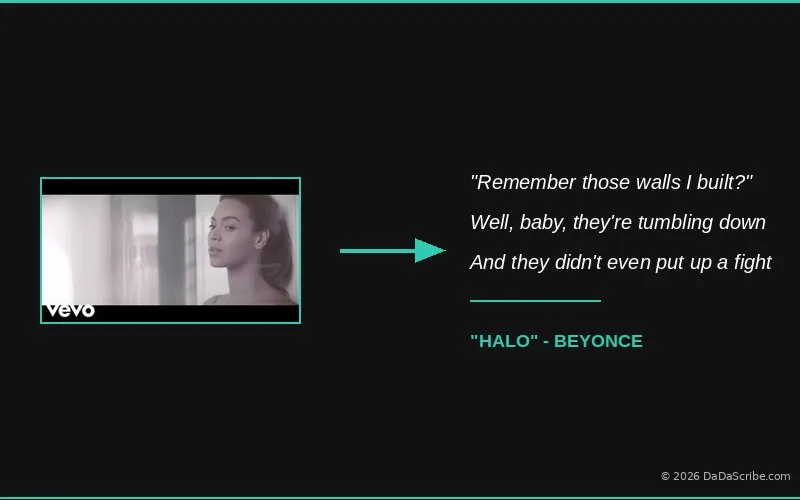
The Beyoncé "Halo" lyrics transcription demo processed a 3-minute-45-second song in 1 minute and 30 seconds. The output captures lyrics accurately despite the layered instrumentation. Raw Whisper on the same track produces fragmented, often nonsensical output. The model tries to transcribe a guitar riff as if it were speech.
This matters whenever your audio source is unpredictable: user uploads, field recordings, conference calls, YouTube videos with background music. You cannot control what your users throw at your API. DaDaScribe's pipeline handles the cleanup so your application does not have to. We covered the real accuracy numbers in our AI vs Human Transcription comparison, including how pre-processing adds 20-25% to the raw accuracy figure. The same principle applies to API calls: cleaner input, better output.
Time to First Working Request
Developer experience is measured in minutes between getting your API key and reading a transcript, not in the number of SDK methods.
DaDaScribe
Three endpoints. The entire API.
curl -X POST https://api.dadascribe.com/transcribe \
  -H "Authorization: Bearer dds_your_key" \
  -H "Content-Type: application/json" \
  -d '{"sources": [{"url": "https://www.youtube.com/watch?v=..."}]}'
Then poll /status with the returned id, and fetch the output from /output/{id}/{filename}. For a two-minute YouTube video, you get TXT and SRT files back in roughly ten seconds.
OpenAI Whisper API
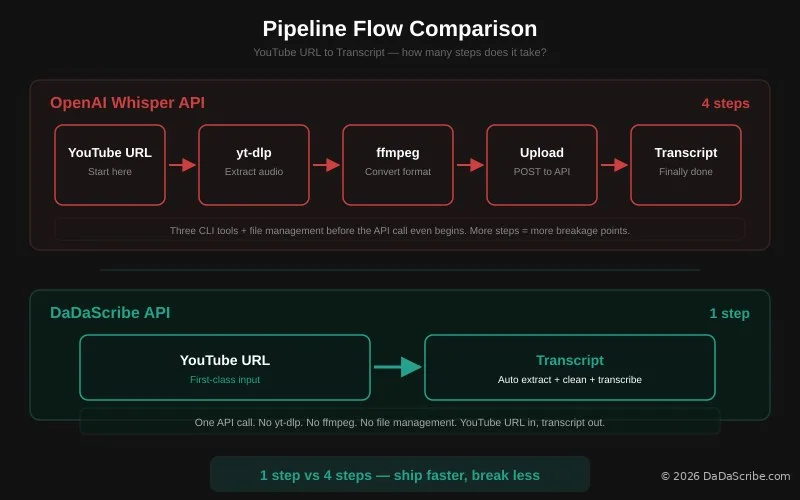
POST /v1/audio/transcriptions requires a file upload. YouTube is not a valid input. You need yt-dlp to extract audio, then ffmpeg to convert to a supported format, then upload. Three tools before you even call the API.
Deepgram and AssemblyAI
Both accept an audio_url parameter, which is closer to DaDaScribe's approach. But that URL must point to a raw audio file, not a YouTube page. You are still running the extraction step yourself.
DaDaScribe eliminates the audio extraction step entirely for YouTube content. One to three fewer tools in your pipeline, and one fewer thing to break.
YouTube as a First-Class Source Format
Every major transcription API comparison article ignores YouTube. Yet for developers building content pipelines, podcast tools, or video processing applications, YouTube is the single most common input format.
DaDaScribe treats a YouTube URL the same way these other APIs treat an audio URL. It is a parameter, not a pre-processing problem. The API handles the download, audio extraction, and cleanup automatically. You send a YouTube link. You get a transcript back. No yt-dlp. No ffmpeg. No temporary file management.
The Lex Fridman podcast demo illustrates this at scale. A 2-hour-31-minute episode was transcribed and translated into four languages in 19 minutes. Doing the same with a Whisper-based pipeline would require extracting 2.5 hours of audio, splitting it into chunks under the file size limit, running each chunk through the API, then stitching the output back together. DaDaScribe handles the entire file in one request.
Built-in Translation: One Request, Five Languages
All four APIs support 99 or more source languages. Translation is where they diverge.
DaDaScribe bakes translation into the transcription request. The translate_to parameter accepts up to five target languages. One API call produces the original transcript plus translated versions in every language you requested, each with its own SRT subtitle file.
Whisper supports translation, but only from non-English audio into English. It is a language-switching feature, not a multi-output translation pipeline. If you need transcripts in Spanish, French, and German from an English podcast, Whisper cannot do it.
Deepgram and AssemblyAI have no built-in translation. You chain your transcription output to a separate translation API like DeepL or Google Cloud Translation. Two API integrations, two billing relationships, two sets of error handling.
The Lex Fridman demo shows this in practice: one request, five languages (English + French, Italian, Portuguese, Spanish), four translated SRT files. A developer building a multilingual content platform saves two to three additional API integrations by going with DaDaScribe.
Speaker Diarization: Named vs Detected
Speaker diarization answers "who said what." All four APIs offer it. The difference is in the output you get.
DaDaScribe takes a speakers parameter: a comma-separated list of names. "speakers": "Lex,Greg" means the transcript labels each utterance with "Lex" or "Greg," not "Speaker A" or "Speaker B."
Deepgram and AssemblyAI detect speakers automatically but label them generically: Speaker 0, Speaker 1, Speaker A, Speaker B. You need post-processing to map those labels to actual names. For a two-person podcast with known hosts, that is an unnecessary step.
Whisper has no built-in diarization. You need a separate model like pyannote.audio and custom logic to align speaker labels with transcription timestamps. It works. It is also an engineering project, not a feature.
If you know the speakers in advance, DaDaScribe gives you named labels in the output.
Pricing: Different Models, Different Math
Before comparing numbers, it is worth acknowledging that these APIs use fundamentally different pricing models. DaDaScribe is subscription-based: you pay a flat monthly fee for a pool of transcription hours. Whisper, Deepgram, and AssemblyAI are pay-as-you-go (PAYG): you pay per minute of audio processed, with no monthly commitment.
That makes a direct per-minute comparison misleading. A DaDaScribe Pro subscription costs $29.99/month for 30 hours — an effective rate of roughly $0.016 per minute. But you cannot buy a single minute of DaDaScribe transcription for $0.016. You buy a monthly bucket. With the PAYG APIs, every minute is a separate charge, and you pay exactly for what you use.
Here is what the same $30 monthly budget gets you on each platform:
| API | $30/mo gets you | Effective rate |
|---|---|---|
| DaDaScribe Pro | 30 hours (1,800 min) | ~$0.016/min |
| OpenAI Whisper | 5,000 minutes (~83 hours) | $0.006/min |
| Deepgram (batch) | ~6,975 minutes (~116 hours) | ~$0.0043/min |
| AssemblyAI (batch) | 15,000 minutes (250 hours) | ~$0.0020/min |
At first glance, DaDaScribe looks expensive. You get far fewer raw transcription minutes per dollar. But this is where the pricing model difference becomes important in the other direction: the PAYG services also charge you for minutes that produce bad output. Noisy audio, music bleed, overlapping speakers — you pay the same rate whether the transcript is usable or not. DaDaScribe's pre-processing pipeline means fewer wasted minutes.
Beyond that, factor in the services DaDaScribe replaces: no separate translation API (DeepL API runs about $20/month), no YouTube extraction infrastructure (compute + ffmpeg + storage), no speaker-name mapping post-processing, no audio cleanup microservice. The total cost of ownership can shift in DaDaScribe's favor depending on how many auxiliary services your pipeline currently depends on.
Volume pricing for DaDaScribe's API is still to be determined. Contact us for questions on that or a custom plan.
Privacy by Design: One-Hour Output Retention
DaDaScribe's output files are served through time-limited capability URLs that expire after one hour. This is not a limitation. It is a deliberate privacy choice.
The company does not want to store third-party transcriptions on its servers longer than necessary. If you are building an application that handles sensitive conversations, medical dictations, legal interviews, or internal meeting recordings, this model matters.
OpenAI retains API inputs and outputs for abuse monitoring unless you explicitly opt out through a separate process. Deepgram's default retention policy uses data for model improvement. AssemblyAI's retention varies by plan tier.
DaDaScribe's one-hour window is the strongest privacy guarantee in this comparison group. You fetch your output, store it in your own infrastructure, and the server-side copy disappears. No data retention agreements to negotiate. No awkward conversations with your compliance team.
Full Feature Matrix
| Feature | DaDaScribe | Whisper | Deepgram | AssemblyAI |
|---|---|---|---|---|
| YouTube URL input | ✓ | ✗ | ✗ | ✗ |
| Built-in translation | ✓ (5 langs) | Partial | ✗ | ✗ |
| Named speaker diarization | ✓ | ✗ | ✗ | ✗ |
| Streaming | ✗ | ✗ | ✓ | ✓ |
| SRT output | ✓ | ✓ | ✓ | ✓ |
| Pre-processing pipeline | ✓ | ✗ | ✗ | ✗ |
| Output retention | 1 hour | Policy-based | Configurable | Plan-dependent |
| API endpoints | 3 | 2 | 10+ | 15+ |
| Pricing model | Subscription | PAYG | PAYG | PAYG |
Which API for Which Developer?
You are building a YouTube content pipeline
Use DaDaScribe. YouTube URLs are first-class input. Translation is built in. Named speakers save post-processing time. The API is three endpoints. You will ship before you finish reading the SDK docs of the alternatives.
You need the absolute lowest per-minute cost
Use AssemblyAI or Deepgram batch endpoints. But budget for the integration complexity. The money you save on transcription you will spend on auxiliary services and engineering time.
You need real-time streaming
Use Deepgram or AssemblyAI. DaDaScribe and Whisper are batch-only. Voice agents, live captions, and conversational AI need sub-300ms latency that only streaming APIs provide.
You need maximum input/output language coverage
Use DaDaScribe. It offers 99 input languages to over 120+ output languages at no extra cost.
You need ro process big files
DaDaScribe offers up to 10GB per file uploads. If you need more than that, please contact us.
You need maximum input-only language coverage with self-hosting
Use Whisper. It is open source, runs on any GPU, supports 99 input languages, and costs nothing beyond your compute bill. You trade convenience for control.
You need privacy-first transcription
Use DaDaScribe. One-hour output retention is the strongest guarantee available. No data lingers on a third-party server. Your transcripts live where you put them.
FAQ
Is the DaDaScribe API production-ready?
Yes. You can implement it and deploy it right now
Does DaDaScribe API support webhooks?
Not yet. The current workflow polls /status for job completion. Webhooks are a natural next step for the API roadmap.
Can I use DaDaScribe API with non-English content?
Yes. The API accepts 99 source languages and can translate output into over 120 languages. The same pre-processing pipeline cleans audio regardless of language.
How does DaDaScribe handle files longer than one hour?
The API accepts up to 10 hours per source. Processing time scales linearly. The Lex Fridman demo processed 2.5 hours in 38 minutes, including four-language translation.
How does accuracy compare to Whisper?
DaDaScribe's consumer product benchmarks at 99.5% on clean audio. Thanks to the pre-processing pipeline, it often outperforms raw Whisper on noisy or music-heavy sources. We covered the real numbers in our AI vs Human Transcription deep-dive. That said, test with your own audio. Benchmarks from someone else's dataset will not predict your results. For song transcription specifically, see our guide to extracting lyrics with AI.
DaDaScribe is the only transcription API that treats YouTube URLs as a first-class input, runs a proprietary pre-processing pipeline on every request, bakes translation into the same API call, and respects user privacy with one-hour output retention. If your application processes video content, serves a multilingual audience, or handles sensitive audio, the API is worth a serious look.
Get your API key at dadascribe.com and run your first transcription in under two minutes. Explore more technical deep-dives at the DaDaScribe Learning Center.
Comments & Questions
Please log in or sign up for a free account to leave a comment or question.
No comments yet. Be the first to ask a question!
Display more comments…