
If you edit your podcast in a DAW (Digital Audio Workstation), you are paying Descript $24/month for transcription bundled with video editing features you do not use.
Here is a better way to spend that money.
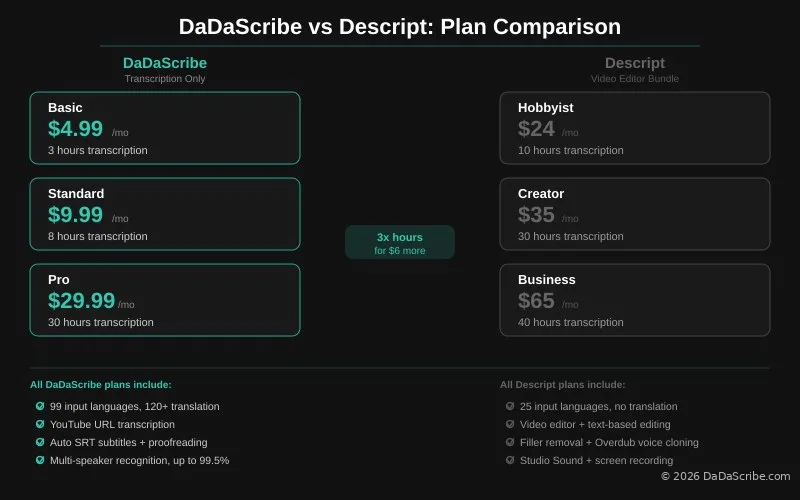
Descript built a good product. Text-based editing is genuinely clever. But its pricing bundles transcription with a full video editor, AI credits, and production tools you may never open. The Hobbyist plan costs $24/mo for 10 hours of transcription. Creator costs $35/mo for 30 hours. Business costs $65/mo for 40 hours.
DaDaScribe offers four transcription plans, and none of them bundle a video editor:
- Free/Demo: free for 10 minutes of transcription a month
- Basic: $4.99/mo for 3 hours a month
- Standard: $9.99/mo for 8 hours a month
- Pro: $29.99/mo for 30 hours a month (works out to $0.016/min)
Every DaDaScribe plan includes the same full feature set: 99 input languages, translation to 120+ languages, YouTube URL transcription, auto SRT subtitles, multi-speaker recognition, and built-in proofreading at up to 99.5% accuracy. There are no feature gates between plans. You pay for transcription hours, not for access to features.
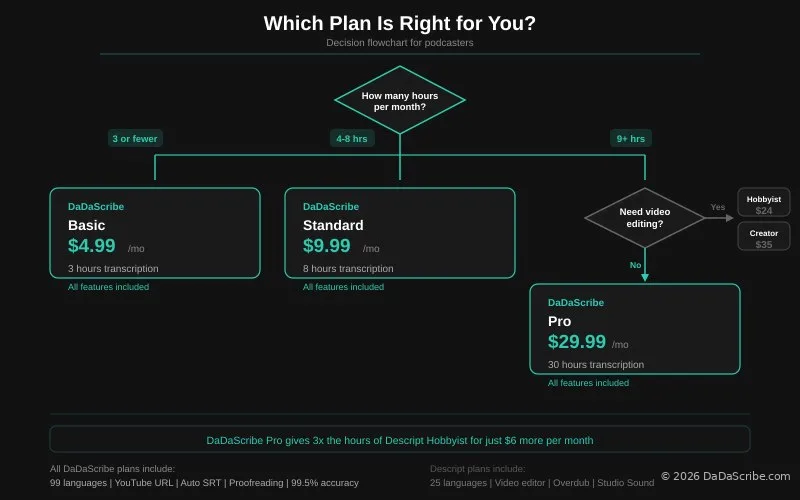
This is where the comparison gets interesting. For $24/mo, Descript gives you 10 hours of transcription inside a video editor. For roughly the same budget on DaDaScribe, you get two choices: spend less and stay lean with Basic or Standard, or spend $29.99/mo on Pro and get 30 hours, triple the transcription for only $5.99 more per month.
This article answers one question: Does your podcast workflow need the Descript bundle at $24/mo, or would a transcription subscription starting at $4.99/mo fit better?
What Descript Actually Does Well
Descript pioneered text-based video editing, and it is genuinely useful. You edit the transcript, and the video or audio edits follow. This saves real time for video podcasters who cut interviews by deleting filler phrases from the transcript instead of scrubbing a timeline.
Descript works best for video podcasters who edit talking-head recordings directly in the transcript. It also works well for teams doing screen recordings and transcription in one workflow, and for users who want recording, transcription, editing, and export in a single app.
Its standout features include one-click filler-word removal ("ums," "uhs"), Studio Sound for audio cleanup, Overdub for voice cloning to fix flubbed lines, and built-in screen recording.
Acknowledging where Descript excels is important. This article is not a hit piece. It is a use-case decision guide for podcasters trying to figure out which subscription actually aligns with how they work.
Descript is a great tool for video podcasters who edit by trimming transcript text. For everyone else, the bundle adds cost without value.
Where Descript Falls Short for Podcasters
No Low-Cost Entry Point
Descript's cheapest paid plan is $24/mo. If you produce a weekly podcast with hour-long episodes, that is roughly 4 hours of content per month. You are paying for 10 hours of transcription you will only half use, plus a video editor you may never open.
DaDaScribe's entry point is $4.99/mo for 3 hours (excluding the free tier, which is great for system performance assessment). For many podcasters, 3 hours covers a typical month. If you need more, Standard at $9.99/mo gives you 8 hours. Either way, you are not paying for unused capacity.
You Pay for the Bundle Whether You Use It or Not
Every Descript plan includes the full video editing suite. If your workflow is record in Riverside or locally, edit in Logic Pro or Audition, and publish through a hosting platform, Descript sits in the middle unused. You are paying $24-65/mo for a video editor you do not need.
Limited Language Support
Descript supports 25 input languages. It does not offer translation output. For podcasters who interview non-English-speaking guests or serve international audiences, this is a hard ceiling. There is no way to get a French subtitle track from an English interview without a separate tool.
No YouTube URL Transcription
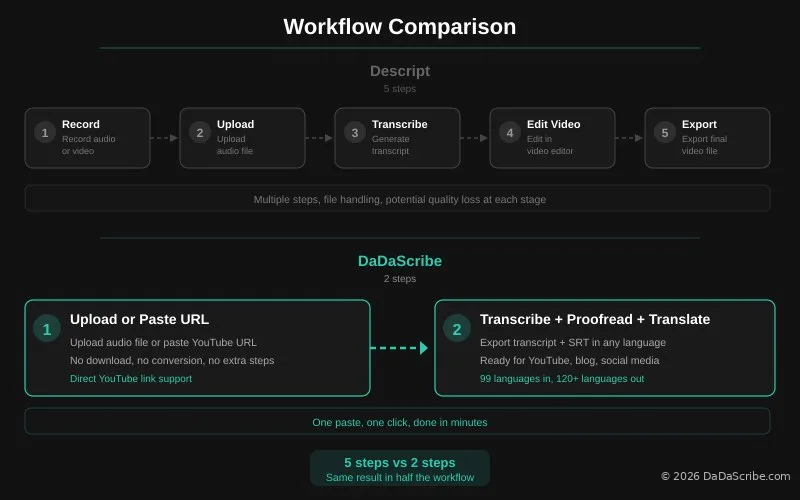
To transcribe a YouTube video with Descript, you must download the video, extract the audio, convert it to a compatible format, and upload it. Several steps. Several minutes. Potential quality loss at each stage. Descript does not accept URLs.
No Built-in Proofreading
The transcript comes as-is. Descript does not run an automated quality pass after transcription. Homophones, context errors, and misheard words pass through to your final export unless you catch them manually.
How DaDaScribe Solves Each Problem
A Plan for Every Volume, Full Features at Every Tier
DaDaScribe's Basic plan at $4.99/mo covers 3 hours of transcription. For a podcaster releasing 3 hour-long episodes per month, that is your entire month covered for less than the cost of a coffee.
Need more? Standard at $9.99/mo gives you 8 hours. That covers a twice-weekly show with room to spare.
Pro at $29.99/mo gives you 30 hours. Here is the number that matters: Descript Hobbyist costs $24/mo for 10 hours. DaDaScribe Pro costs $29.99/mo for 30 hours. You spend $5.99 more per month and get three times the transcription capacity.
And unlike Descript, every DaDaScribe plan includes the same features. 99 input languages. Translation to 120+ languages. YouTube URL support. Auto SRT subtitles. Built-in proofreading. Multi-speaker recognition. No feature gates. You pay for hours, not for access.
99 Languages In, 120+ Languages Out
Interview a guest in Arabic, Portuguese, or Mandarin? DaDaScribe transcribes in the source language and translates to any of 120+ languages with auto SRT output. Descript caps at 25 languages with no translation path.
Direct YouTube URL Support
Paste a YouTube link. Get a timestamped transcript with optional SRT subtitles. No download. No conversion. No upload. For podcasters researching guests, pulling competitor quotes, or repurposing old episodes from YouTube archives, this is the workflow that pays for itself in time saved.
Built-in Proofreading
Every transcript runs through a post-transcription quality pass. Common errors like homophones and context mistakes get caught before you export. Accuracy reaches up to 99.5% on clean audio, comparable to human transcription. The proofreading step is invisible, but it measurably improves the output you work with.
Auto SRT Subtitles
Generate subtitle files in any target language with one click. Export directly to YouTube, video editors, or social media platforms. No separate subtitling tool required.
DaDaScribe handles a 2.5-hour podcast episode in under 40 minutes with five-language output. On the Basic plan at $4.99/mo, you can transcribe one of these plus still have time left over for a shorter episode.
Real Demo Examples: Processing Data from Podcast Demos
The processing times below come from real podcast-length content run through DaDaScribe's platform. Not estimates. Not best-case scenarios. These are measured results from publicly available demos.
| Demo Content | Duration | Processing Time | Language Outputs |
|---|---|---|---|
| Lex Fridman with Greg Lukianoff | 2:31:58 | 19:39 | en, fr, it, pt, es |
| Walter Isaacson on Lex Fridman | 2:07:49 | 15:34 | en, zh-CN, fr, pt, es |
| Mark Zuckerberg on Lex Fridman | 2:41:59 | 18:42 | en, fr, it, pt, es |
Every one of these episodes is over 2 hours long. Every one processed in 26 to 40 minutes. Every one produced output in 4-5 languages with speaker labels, timestamps, and auto SRT subtitles.
Cost context: The DaDaScribe Basic plan at $4.99/mo covers 3 hours of transcription. You can process one of these 2.5-hour Lex Fridman episodes plus a 60-minute short-form episode in a single month, or even more, with all the transcriptions, translations, and subtitles included. The same month on the cheapest Descript plan costs $24/mo. See the full DaDaScribe pricing plans for all three tiers.
View the demos for yourself:
Side-by-Side Comparison
| Feature | DaDaScribe Basic | DaDaScribe Standard | DaDaScribe Pro | Descript Hobbyist | Descript Creator |
|---|---|---|---|---|---|
| Monthly price | $4.99 | $9.99 | $29.99 | $24 | $35 |
| Transcription hours | 3 | 8 | 30 | 10 | 30 |
| Languages input | 99 | 99 | 99 | 25 | 25 |
| Languages translation | 120+ | 120+ | 120+ | None | None |
| YouTube URL transcription | Yes | Yes | Yes | No | No |
| Auto SRT subtitles | Yes | Yes | Yes | Yes | Yes |
| Built-in proofreading | Yes | Yes | Yes | No | No |
| Multi-speaker recognition | Yes | Yes | Yes | Yes | Yes |
| Accuracy | Up to 99.5% | Up to 99.5% | Up to 99.5% | Not published | Not published |
| Video editor | No | No | No | Yes | Yes |
| Text-based editing | No | No | No | Yes | Yes |
| Filler-word removal | No | No | No | Yes | Yes |
| Voice cloning (Overdub) | No | No | No | Yes | Yes |
| Studio Sound audio cleanup | No | No | No | Yes | Yes |
What to notice in this table:
DaDaScribe Pro ($29.99/mo) gives you 30 hours of transcription with the full feature set. Descript Hobbyist ($24/mo) gives you 10 hours inside a video editor. For $5.99 more per month, DaDaScribe Pro delivers triple the transcription capacity.
DaDaScribe Standard ($9.99/mo) gives you 8 hours of transcription. That is only 2 hours less than Descript Hobbyist ($24/mo, 10 hours) for less than half the price.
And if you only need 3 hours per month, DaDaScribe Basic at $4.99/mo is a price point Descript simply does not offer.
A note on Descript's unique features: text-based editing, filler removal, and voice cloning are real differentiators. If these are essential to your workflow, Descript is the right tool. The table above is not a scorecard. It is a map to help you find the fit that matches your actual production process.
When to Use DaDaScribe Over Descript
Use DaDaScribe when you edit your podcast in a dedicated DAW like Logic, Ableton, Audition, or GarageBand, and just need clean transcripts for show notes and repurposing. At $4.99/mo for 3 hours or $9.99/mo for 8 hours, you are paying for transcription, not for a video editor you do not use.
Use DaDaScribe when your monthly transcription volume is modest. If you release 3-4 episodes per month, the Basic or Standard plan covers your needs at a fraction of Descript's entry price.
Use DaDaScribe when you publish in multiple languages or interview non-English-speaking guests. All plans include 99 input languages with translation to 120+ output languages. Descript caps at 25 with no translation. This is the core of the Descript alternative for podcasters comparison.
Use DaDaScribe when you need YouTube URL transcription for research and quoting. Paste a link. Get a transcript. No file handling required.
Use DaDaScribe when you want SRT subtitles in any language without exporting and reformatting. One click generates subtitle files in your target language.
When to Use Descript Over DaDaScribe
Use Descript when text-based video editing genuinely saves you editing time. If editing the transcript is faster than editing the timeline, Descript earns its subscription.
Use Descript when you want an all-in-one recording, editing, and transcription subscription. The bundle is the value proposition.
Use Descript when filler-word removal, Studio Sound, or Overdub are essential to your workflow. These features are unique to Descript and genuinely useful.
Use Descript when cost is secondary to workflow integration. If a single app for recording through publishing saves you more in time than it costs in subscription fees, it is the right tool.
Pro Tips for Podcasters Using Transcription
Match your plan to your actual output, not your ambitions. Be honest about how many episodes you release each month. If you publish weekly, 3-4 hours of transcription is realistic. Paying for 10 hours on Descript Hobbyist means you are buying capacity you may never fill. DaDaScribe Basic at $4.99/mo covers 3 hours, and Standard at $9.99/mo covers 8 hours.
Transcribe every episode for SEO. Google indexes text, not audio. A transcribed episode adds 8,000 to 12,000 words of searchable content per hour. Data shows a 32% increase in listen time when transcripts include timestamps. For more tips, explore the DaDaScribe Learning Center.
Use transcripts for repurposing. One podcast episode becomes a blog post, 3 to 5 social media clips, email newsletter content, and a set of searchable quotes. Transcripts are the raw material that powers everything else.
Build a searchable transcript archive. Transcribe back episodes, especially interviews with guests who later become notable. Ctrl+F across a year of recordings is a superpower no podcaster should ignore.
Subtitle YouTube clips in multiple languages. Generate SRT files in your target languages, upload them to YouTube, and reach non-English-speaking audiences organically. The audience is there. The subtitles are the unlock.
Record with transcription in mind. Clean audio equals better transcripts. If you record remotely, ask guests to use headphones and a quiet room. It costs nothing and improves accuracy measurably.
Try DaDaScribe on your own podcast. Upload an episode or paste a YouTube URL at dadascribe.com. See the processing speed and language output for yourself. Browse the demos page for podcast-specific examples first.
About the data: Processing times in this article come from publicly available DaDaScribe demo transcriptions. Accuracy figures are from DaDaScribe's internal analysis of platform transcriptions.
Comments & Questions
Please log in or sign up for a free account to leave a comment or question.
No comments yet. Be the first to ask a question!
Display more comments…